See It In Action
Each block below is a short GIF cut from the full walkthrough above - same order as the video, so you can jump to whichever workflow matters most. Want one continuous flow? ▶ Watch the 12-minute walkthrough on YouTube.
Everything you need to install, configure, and use OpenConstructionERP for professional construction cost estimation.
Onboarding → New project → BoQ → BIM linking → DWG → PDF takeoff → Full estimate → Tasks → Data Explorer → AI estimate → Portfolio.
Captions, chapters and 1.5× playback are built into the player above. Prefer to watch directly on YouTube? ▶ Open on YouTube · subscribe to the channel for new release walkthroughs · download MP4 (47 MB).
Each block below is a short GIF cut from the full walkthrough above - same order as the video, so you can jump to whichever workflow matters most. Want one continuous flow? ▶ Watch the 12-minute walkthrough on YouTube.
OpenConstructionERP is a complete construction cost estimation and project management platform that runs entirely on your machine. It replaces expensive commercial estimating suites with an open, self-hosted alternative. The platform covers the entire construction lifecycle - from initial feasibility studies and quantity takeoff to detailed BOQ preparation, tendering, bid comparison, project execution, quality management, and financial control. All your data stays on your server. No cloud dependency, no subscriptions, no per-seat fees.
v17.6.0 highlights: 192 modules covering the full construction lifecycle - Contacts Directory, Tasks with Kanban, RFI tracking, Finance (invoices, budgets, EVM), Procurement, Safety, Meetings, Quality Inspections, NCR, Submittals, Correspondence, CDE (ISO 19650), Transmittals, BIM Hub, Asset Register with COBie export, Reporting & KPI dashboard, Markups (PDF↔DWG↔hub), Pivot visualisations & Charts column picker, Pluggable email service, Multi-tenant Contacts, scheduled reports, Regional Packs, and full Import/Export.

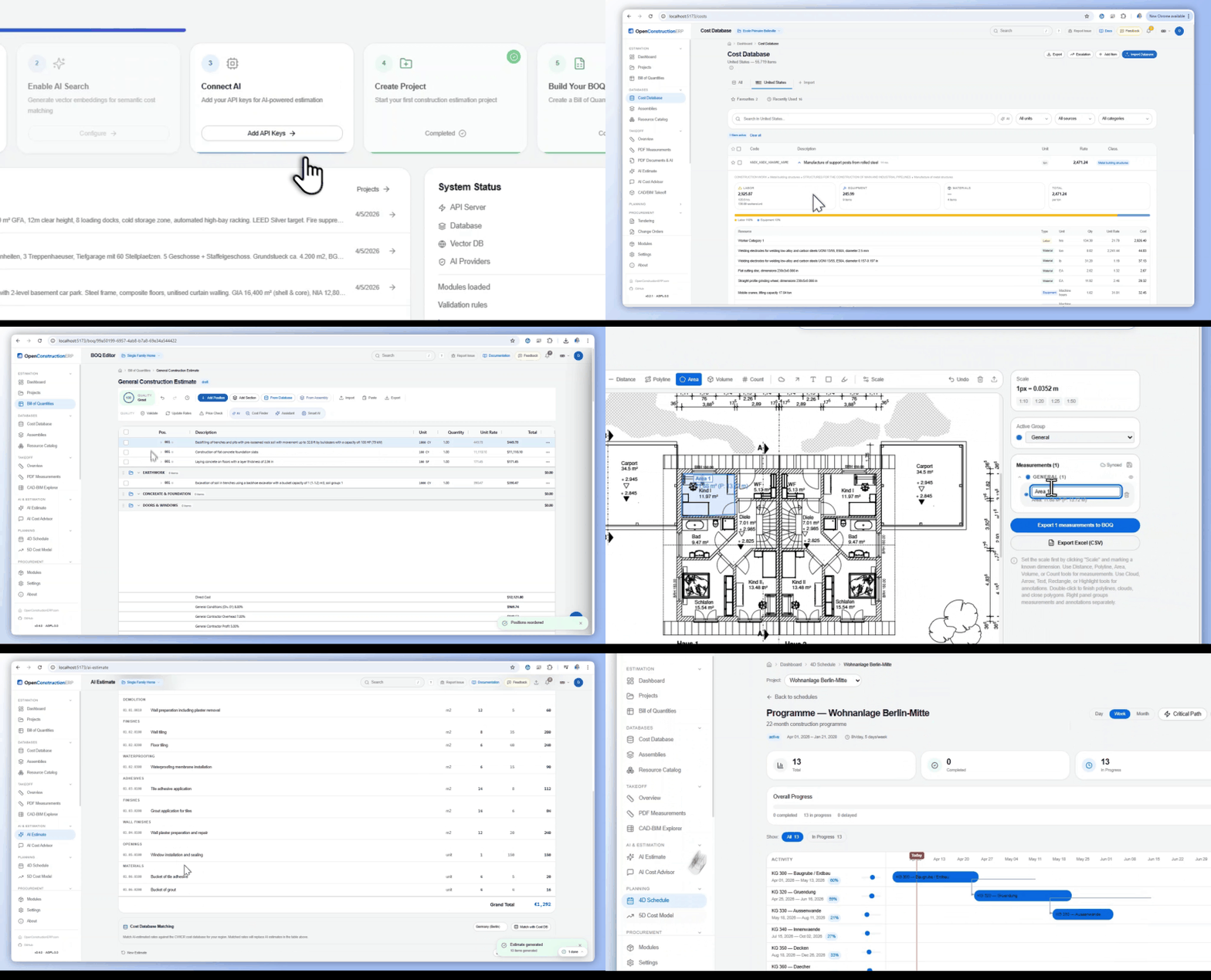
Hierarchical Bills of Quantities with sections, positions, resources, assemblies, and automatic markups.
Cost bases from 9 national sources, published into 48 market editions in local currency and language, with 36 regional databases ready to import.
Generate BOQ from text, photos, PDFs, Excel, or CAD/BIM models using any LLM provider.
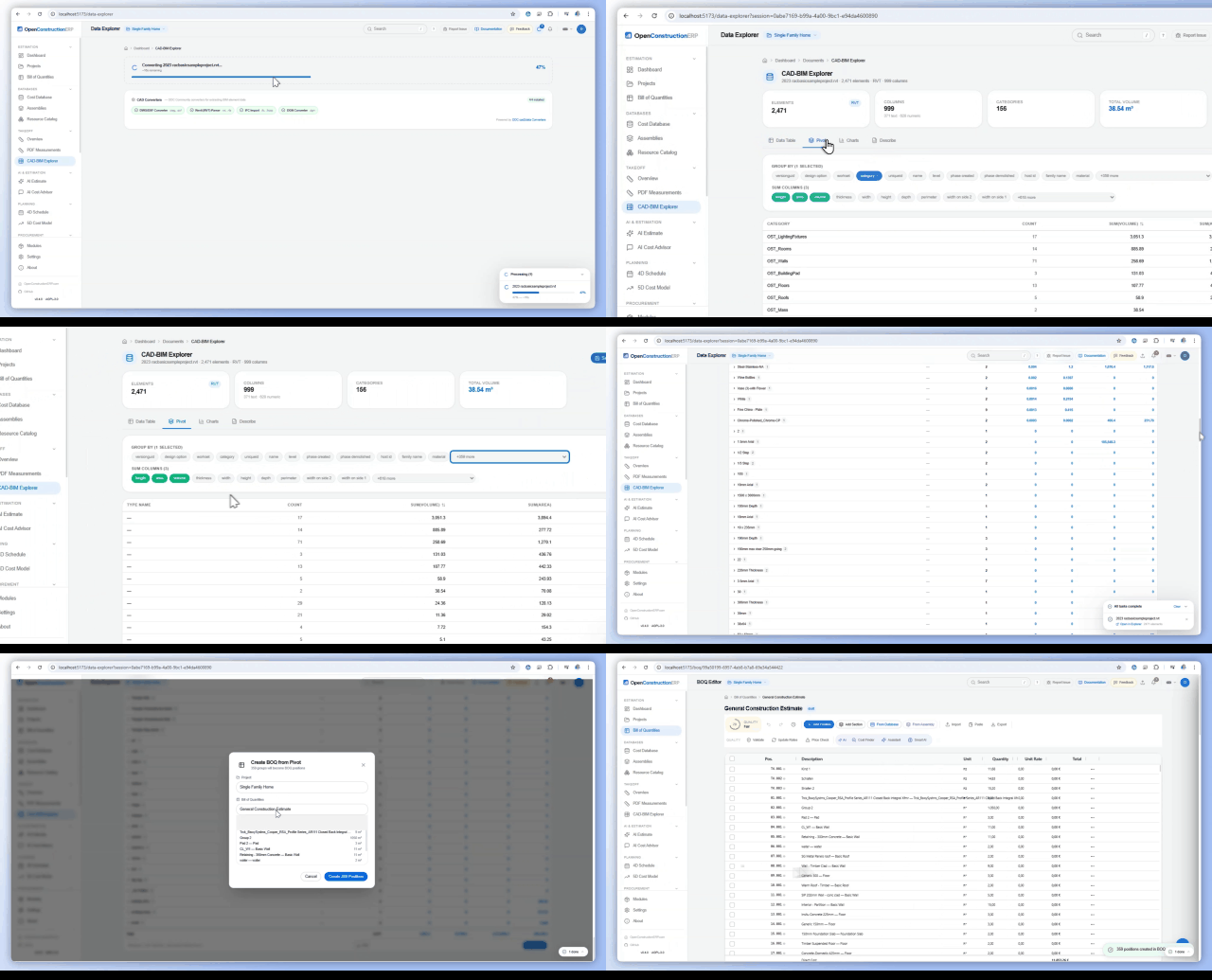
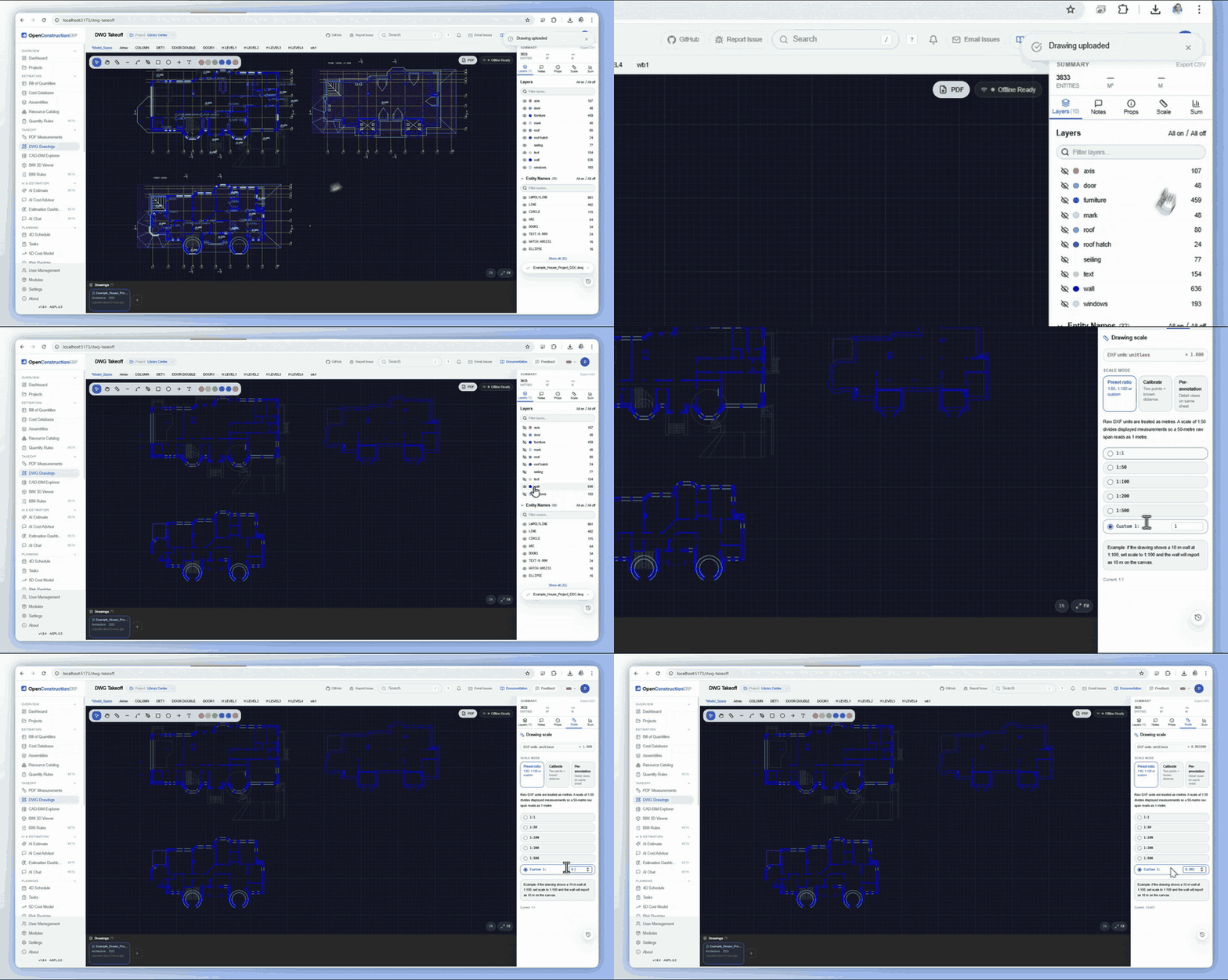
Extract quantities from RVT, IFC, DWG, DGN via DDC converters.
Gantt scheduling with CPM, Earned Value Management, S-curve, Monte Carlo simulation.
Finance, Safety, Quality, CDE, BIM Hub, Procurement, RFI, Tasks, Meetings, and more. Enable only what you need.
After installing OpenConstructionERP, follow these steps to set up your first project and create your first cost estimate. The entire process takes about 10 minutes.
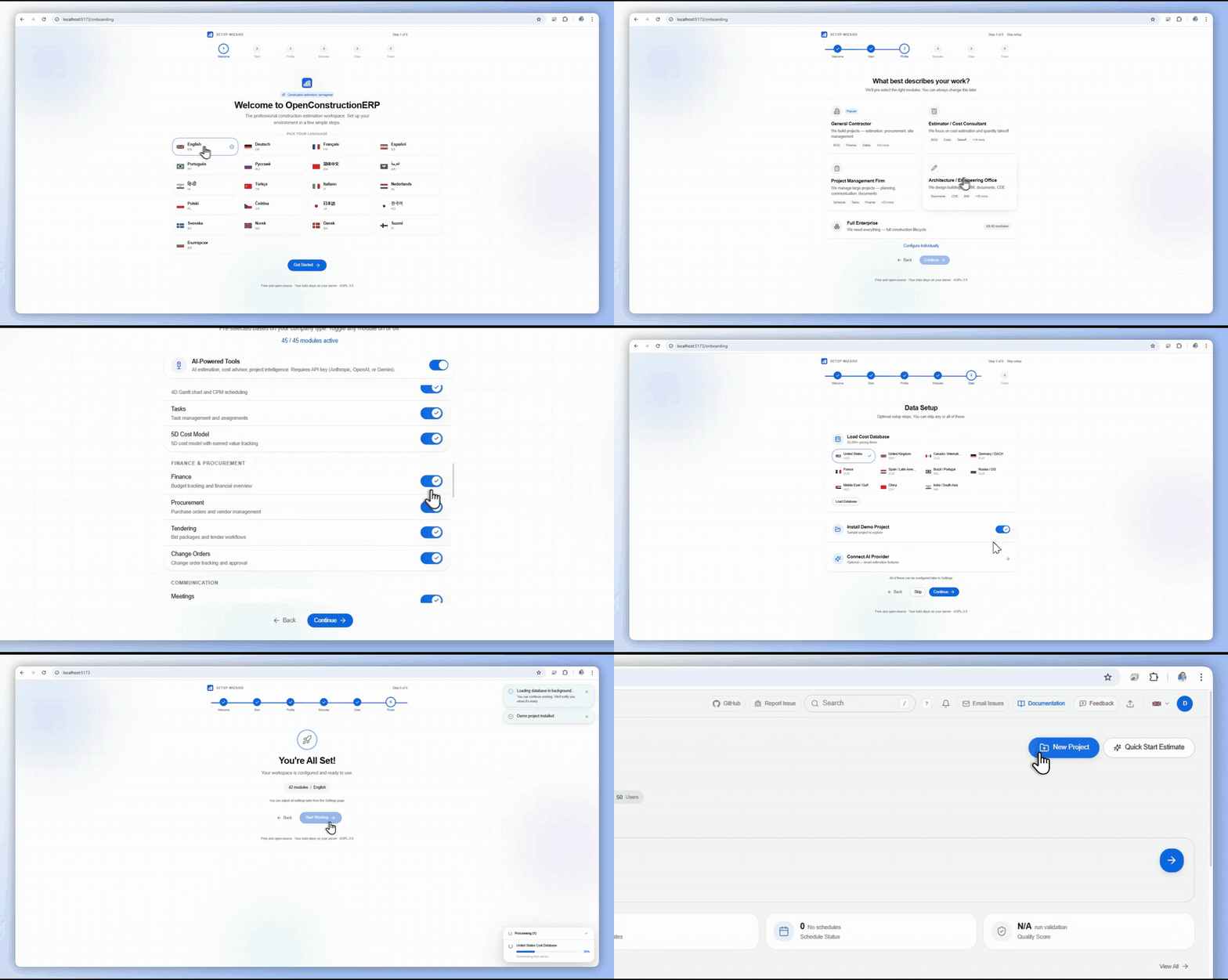
Open your browser and navigate to http://localhost:5173 (local development) or http://localhost:8080 (Docker). You will see the login page with a "Demo Access" panel. Click on Admin to log in instantly with the demo account, or enter your own credentials if you registered a new account.
On first login, the onboarding wizard guides you through initial setup:
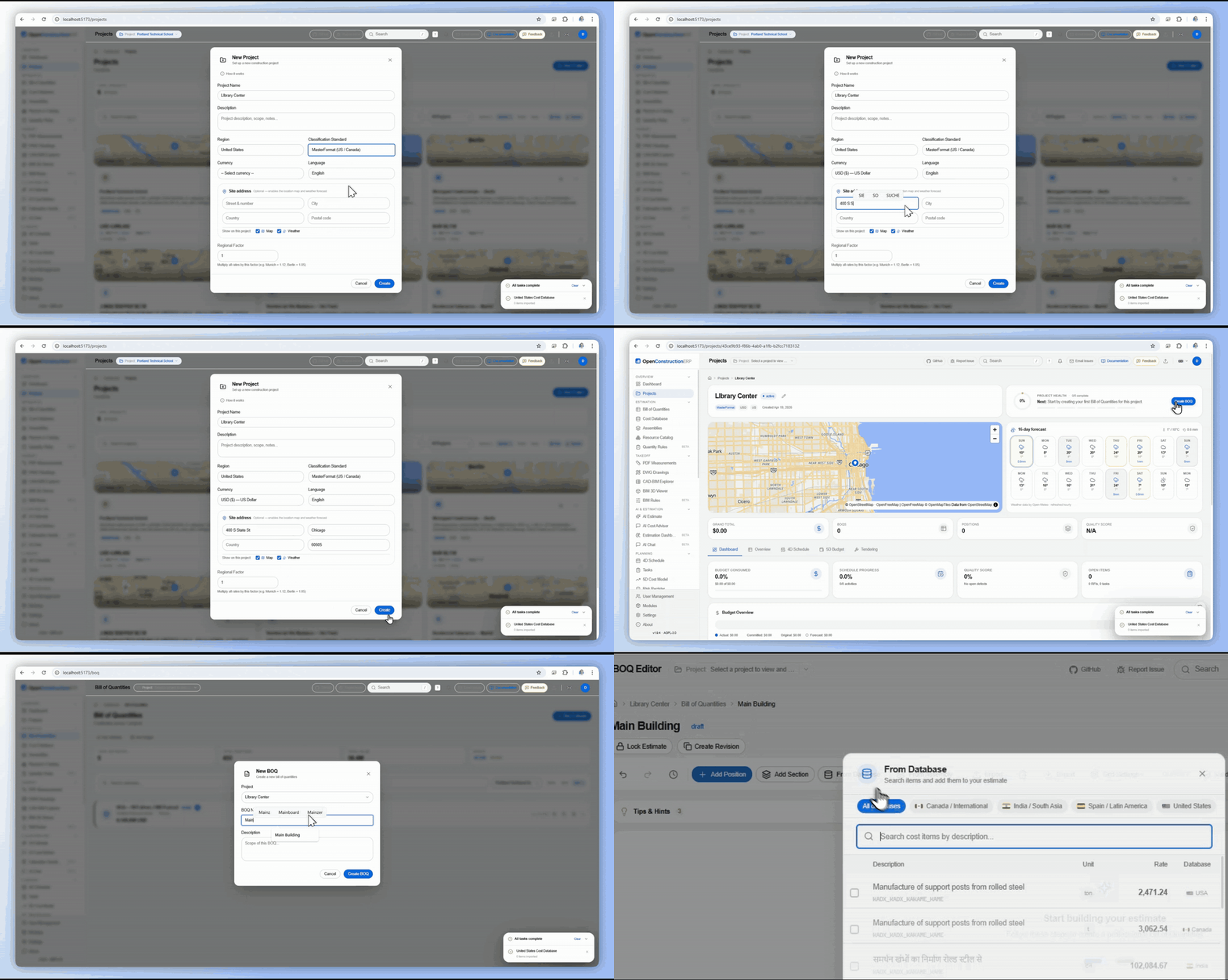
Click New Project on the Dashboard or navigate to Projects. Fill in:
After creating the project, you are redirected to the project detail page where you can start adding BOQs.
From the project page, click New Estimate. Give it a name (e.g., "Cost Estimate v1") and optionally choose a template. The BOQ editor opens with an empty grid ready for your first position.
In the BOQ editor, click Add Position or press Enter on an empty row. Fill in:
The Total column calculates automatically (Quantity x Unit Rate). You can also search the cost database by clicking the database icon next to any position to find and apply a rate from the 120,000+ catalogued cost items.
OpenConstructionERP is designed to be easy to install regardless of your technical background. Choose the method that matches your setup - all options take less than 5 minutes. The application uses an embedded PostgreSQL by default (no Docker, no separate database server, no setup), so everything works out of the box. Requires Python 3.12+ for the pip and one-line paths.
pip install --upgrade openconstructionerp
openestimate
Installs backend + pre-built React frontend in one wheel (~7.4 MB). Opens at http://localhost:8080 with the full UI. Embedded PostgreSQL, zero config. If anything looks wrong, run openestimate doctor.
On Ubuntu 23.04+ (including Ubuntu 26) and Debian 12+, pip install directly to the system Python fails with error: externally-managed-environment (PEP 668). Use a virtual environment instead:
# Ubuntu 26 - install Python 3.12 explicitly if needed
sudo apt install -y python3.12 python3.12-venv

# Create and activate a venv, then install
python3.12 -m venv ~/openestimate-venv
source ~/openestimate-venv/bin/activate
pip install --upgrade openconstructionerp
openestimate
If pip falls back to a source build, install the headers: sudo apt install -y build-essential libpq-dev libjpeg-dev zlib1g-dev libgeos-dev. Full Linux guide with troubleshooting: docs/INSTALL_LINUX.md.
# Linux / macOS
curl -fsSL https://raw.githubusercontent.com/datadrivenconstruction/OpenConstructionERP/main/scripts/install.sh | bash

# Windows (PowerShell)
irm https://raw.githubusercontent.com/datadrivenconstruction/OpenConstructionERP/main/scripts/install.ps1 | iex
Picks Docker if installed, otherwise uv, otherwise pip. Runs at http://localhost:8080.
git clone https://github.com/datadrivenconstruction/OpenConstructionERP.git
cd OpenConstructionERP
make quickstart
Opens at http://localhost:8080 (~2 min first build).
git clone https://github.com/datadrivenconstruction/OpenConstructionERP.git
cd OpenConstructionERP

# Backend (embedded PostgreSQL, zero config)
cd backend && pip install -r requirements.txt
uvicorn app.main:create_app --factory --reload --port 8000

# Frontend (new terminal)
cd frontend && npm install && npm run dev
Backend: http://localhost:8000 / Frontend: http://localhost:5173
| Account | Password | Role | |
|---|---|---|---|
| Admin | demo@openconstructionerp.com | DemoPass1234! | Full access |
| Estimator | estimator@openconstructionerp.com | DemoPass1234! | Estimator |
| Manager | manager@openconstructionerp.com | DemoPass1234! | Manager |
5 demo projects (Berlin, London, New York, Paris, Dubai) with complete BOQs, schedules, and cost models.
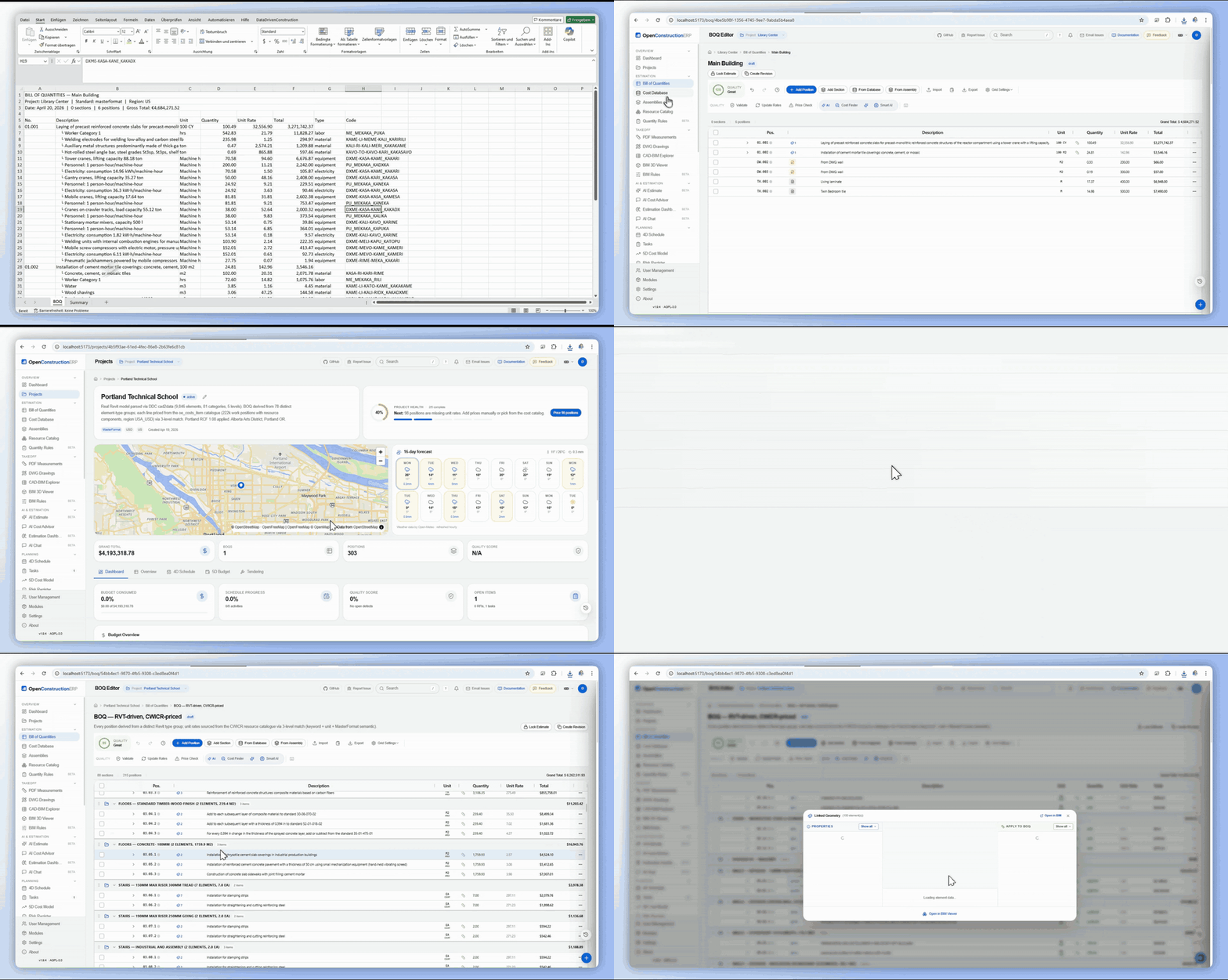
The Bill of Quantities editor is where you spend most of your time. It provides a professional, spreadsheet-like interface powered by AG Grid with construction-specific features built in - hierarchical sections, resource linking, assembly recipes, and automatic markup calculations. Every change is tracked with full undo/redo support. 42 validation rules run automatically in the background, catching errors like missing quantities, zero prices, duplicate positions, and classification compliance issues before they become problems.
🎬 See the BOQ editor in action on YouTube - keyboard-first editing, 120K+ priced items, live quality score.

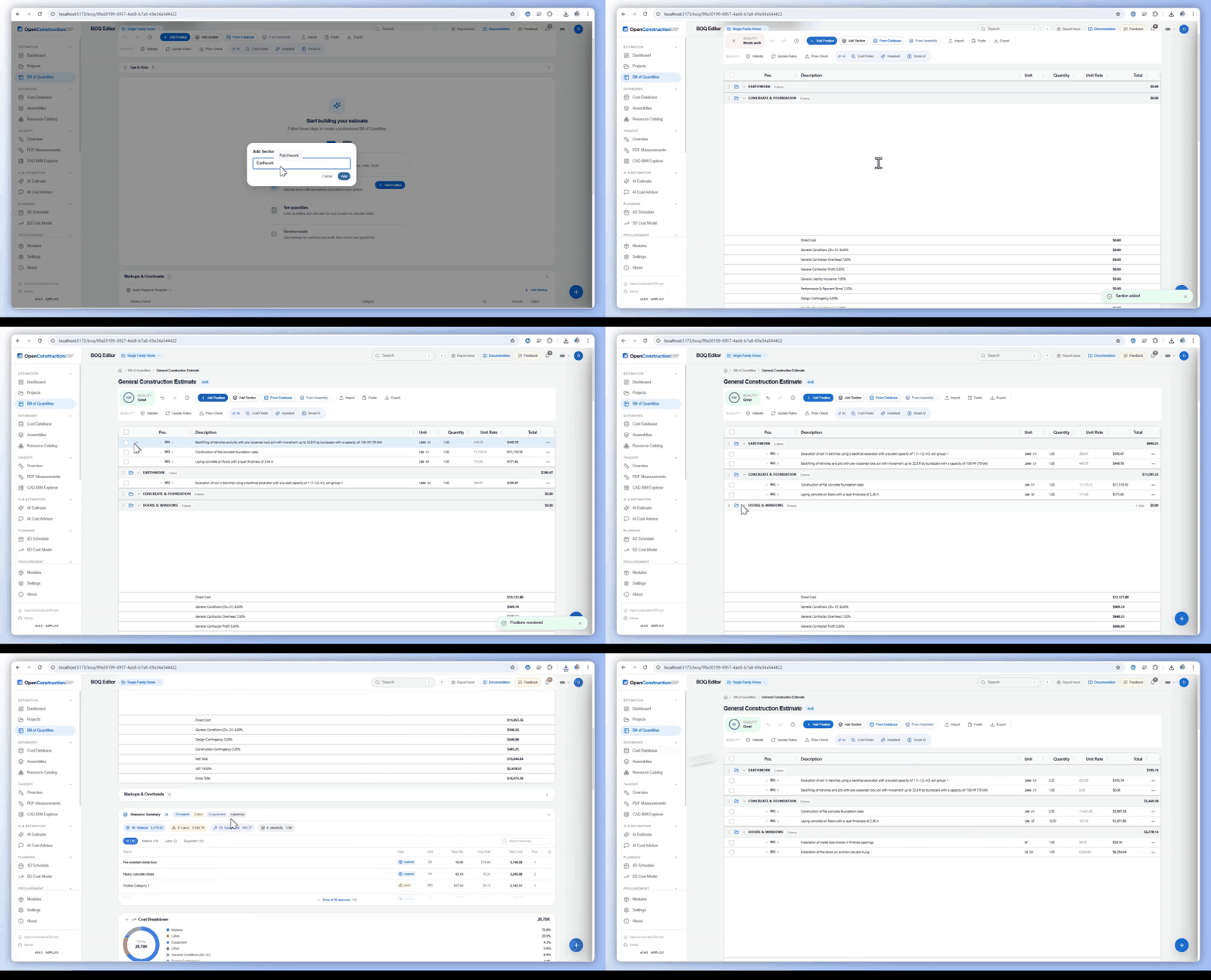
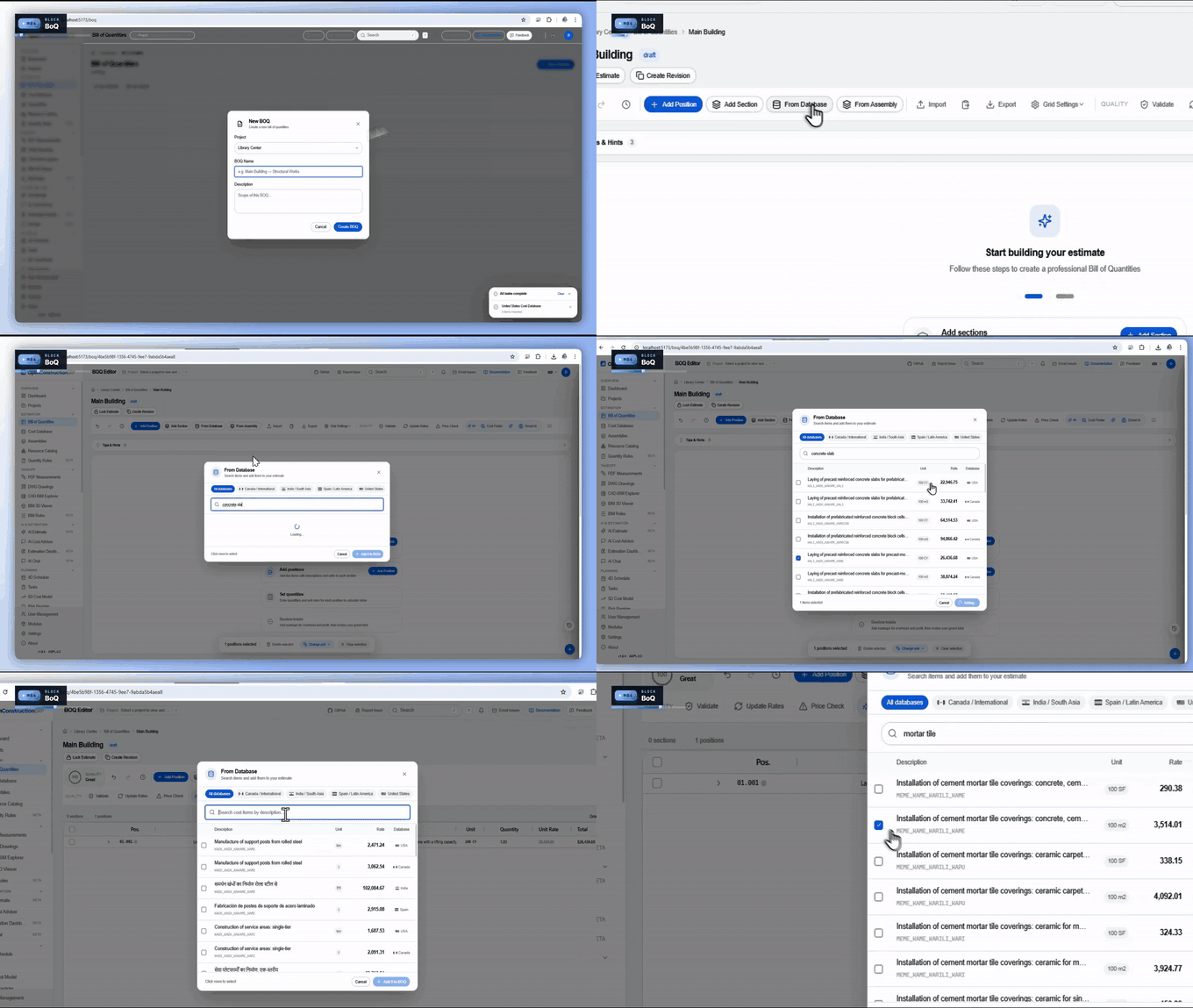
Sections organize your BOQ into logical groups (e.g., "300 Structure", "400 HVAC"). To create a section:
You can collapse/expand sections to focus on specific trades. Drag sections to reorder the entire BOQ structure.
Each BOQ position can have linked resources that break down the unit rate into components:
To add resources: expand a position row, click "Add Resource", search the catalog, set the quantity factor (e.g., 120 kg rebar per m3 concrete). The position unit rate updates automatically from the sum of its resources.
Markups are applied after the net total (sum of all positions). Common markups include:
Click Add Markup in the toolbar. You can set regional defaults or customize per project. Markups can be percentage-based or fixed amounts, and they compound in order (overhead first, then profit on the overhead-inclusive amount, then VAT on the total).
Press Ctrl+Shift+V or click the shield icon in the toolbar to run validation. The system checks your BOQ against the selected rule sets and shows results inline:
The BOQ editor supports importing from multiple sources:
| Shortcut | Action |
|---|---|
Ctrl+K | Command palette |
Ctrl+N | New project |
Ctrl+Shift+V | Run validation |
Ctrl+Z / Y | Undo / Redo |
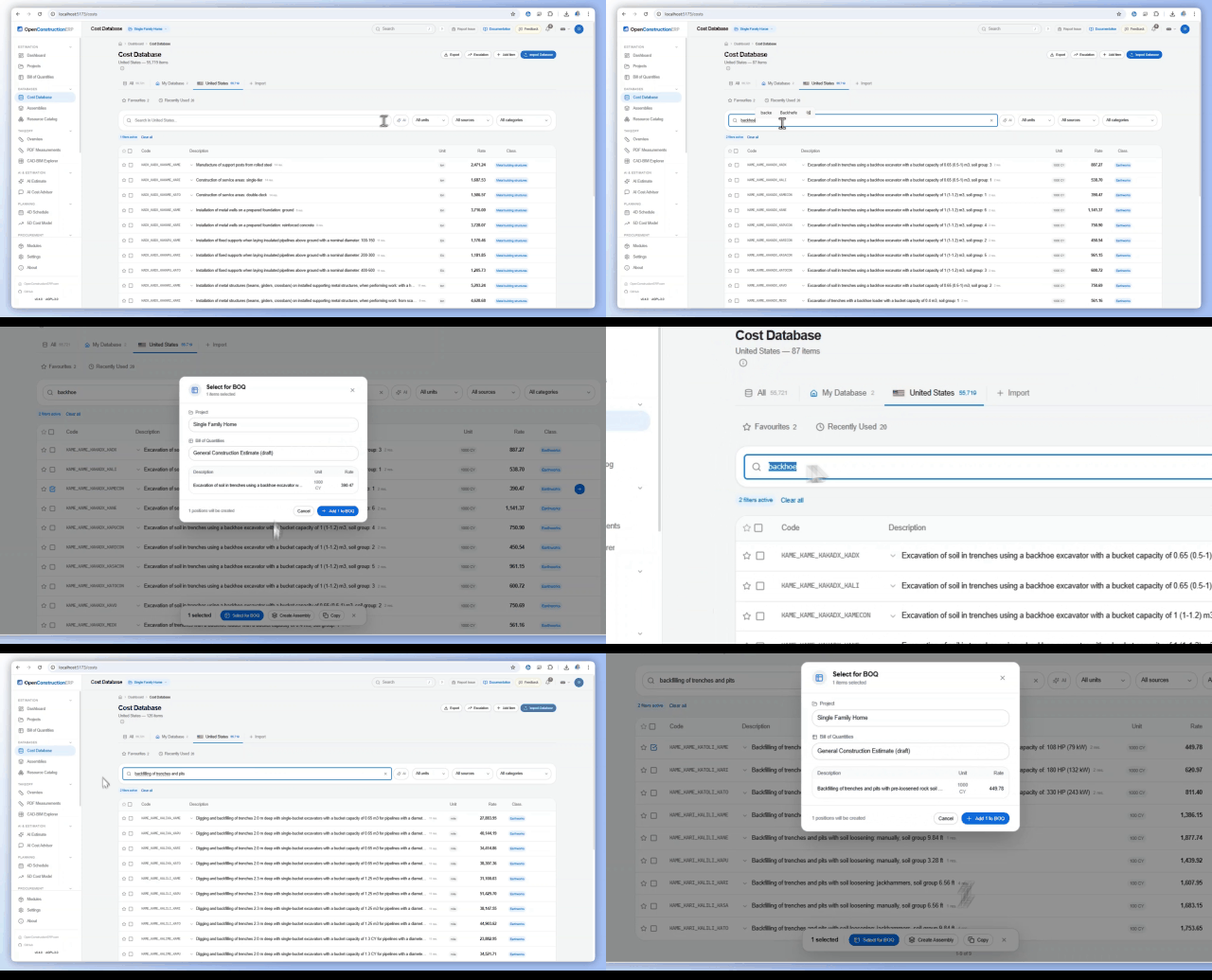
Access the largest open-source construction cost database in the world - 120,000+ cost items across 48 regions. The global CWICR database contributes 55,000+ cost items with descriptions in up to 9 languages, organized by trade (earthworks, concrete, masonry, steel, roofing, facades, HVAC, electrical, plumbing, finishing, landscaping). Each item includes a unit of measurement, base rate for the specified region, classification codes (DIN 276, NRM, MasterFormat), and component breakdown (materials, labor, equipment) when available.

| Region | Currency | Standard | Items |
|---|---|---|---|
| Germany (DACH) | EUR | DIN 276 | 55,719 |
| United Kingdom | GBP | NRM 1/2 | 55,719 |
| United States | USD | MasterFormat | 55,719 |
| France | EUR | DPGF | 55,719 |
| Russia | RUB | GESN | 55,719 |
| UAE | AED | Local | 55,719 |
| China | CNY | GB/T | 55,719 |
| India | INR | CPWD | 55,719 |
The cost database is designed for two main workflows:
Each cost item contains:
Enable semantic search to find cost items by meaning, not just exact keyword matches. When you search for "concrete wall", the system also finds items like "reinforced partition C30/37, 24cm with formwork" - even though the exact words do not appear. This is powered by sentence-transformer embeddings that convert descriptions into numerical vectors and find the closest matches in multi-dimensional space. Two vector database backends are supported: LanceDB (embedded, runs in-process with no separate server, 384-dimensional embeddings) and Qdrant (production server with pre-built 3072-dimensional snapshots downloadable from GitHub).
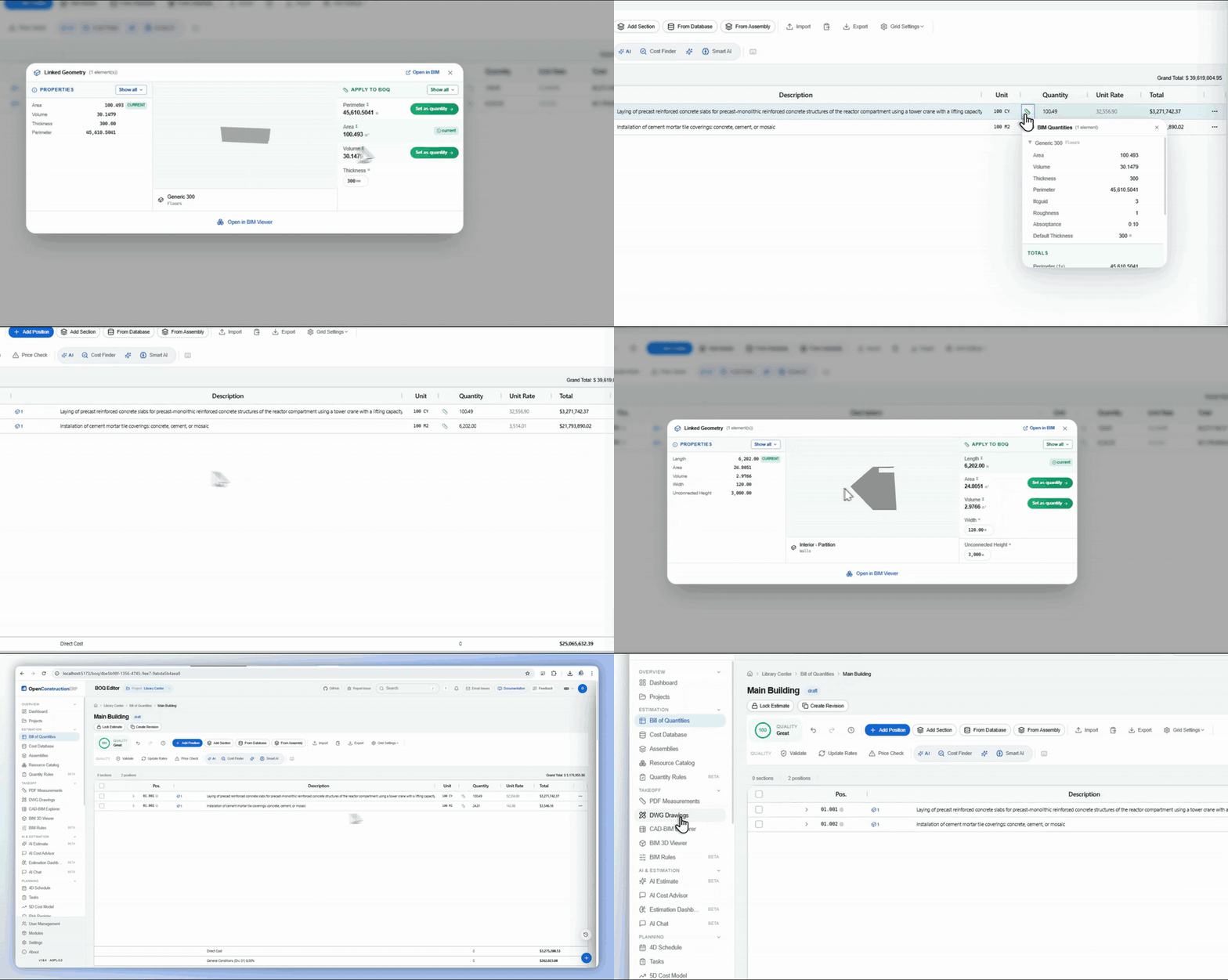
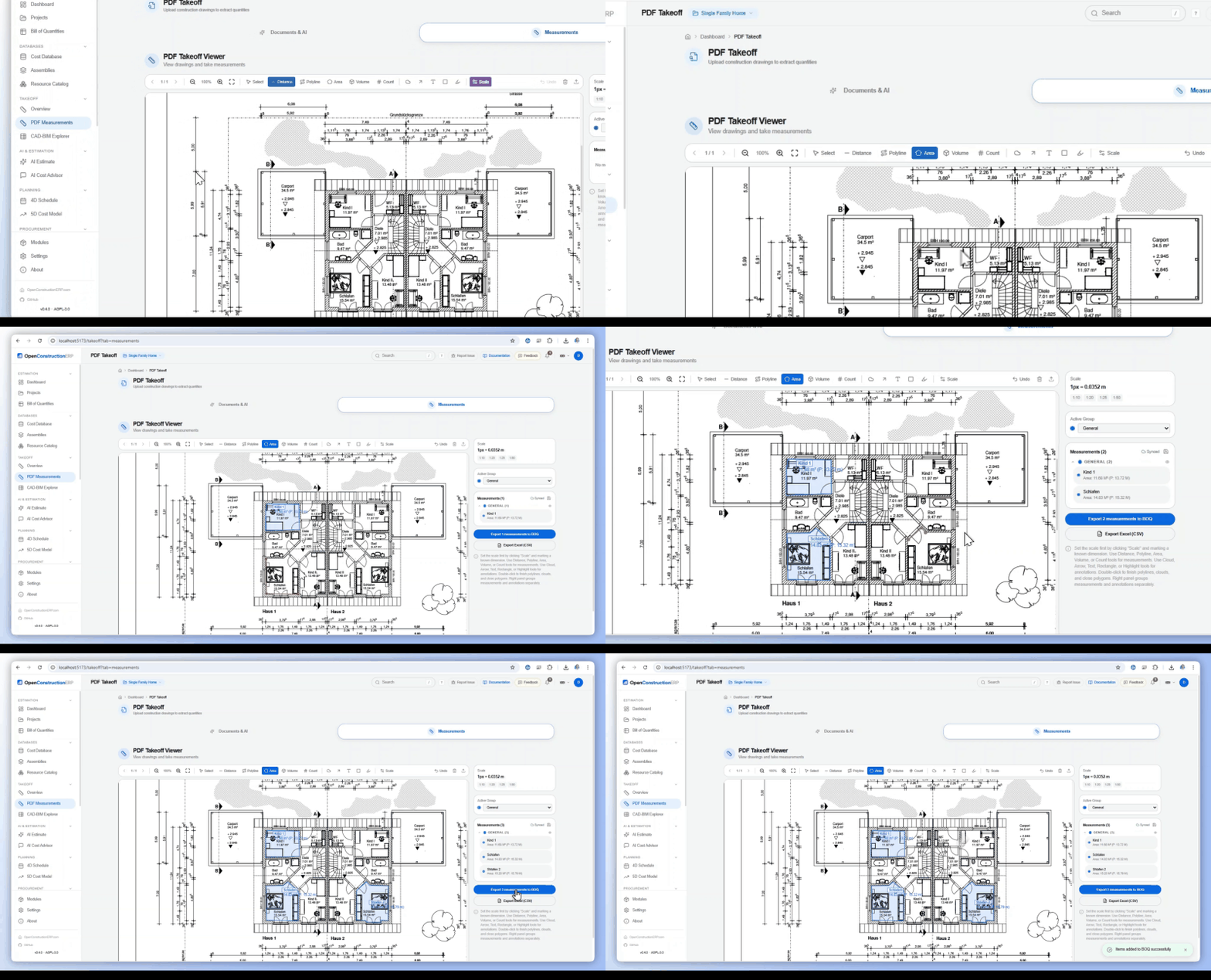
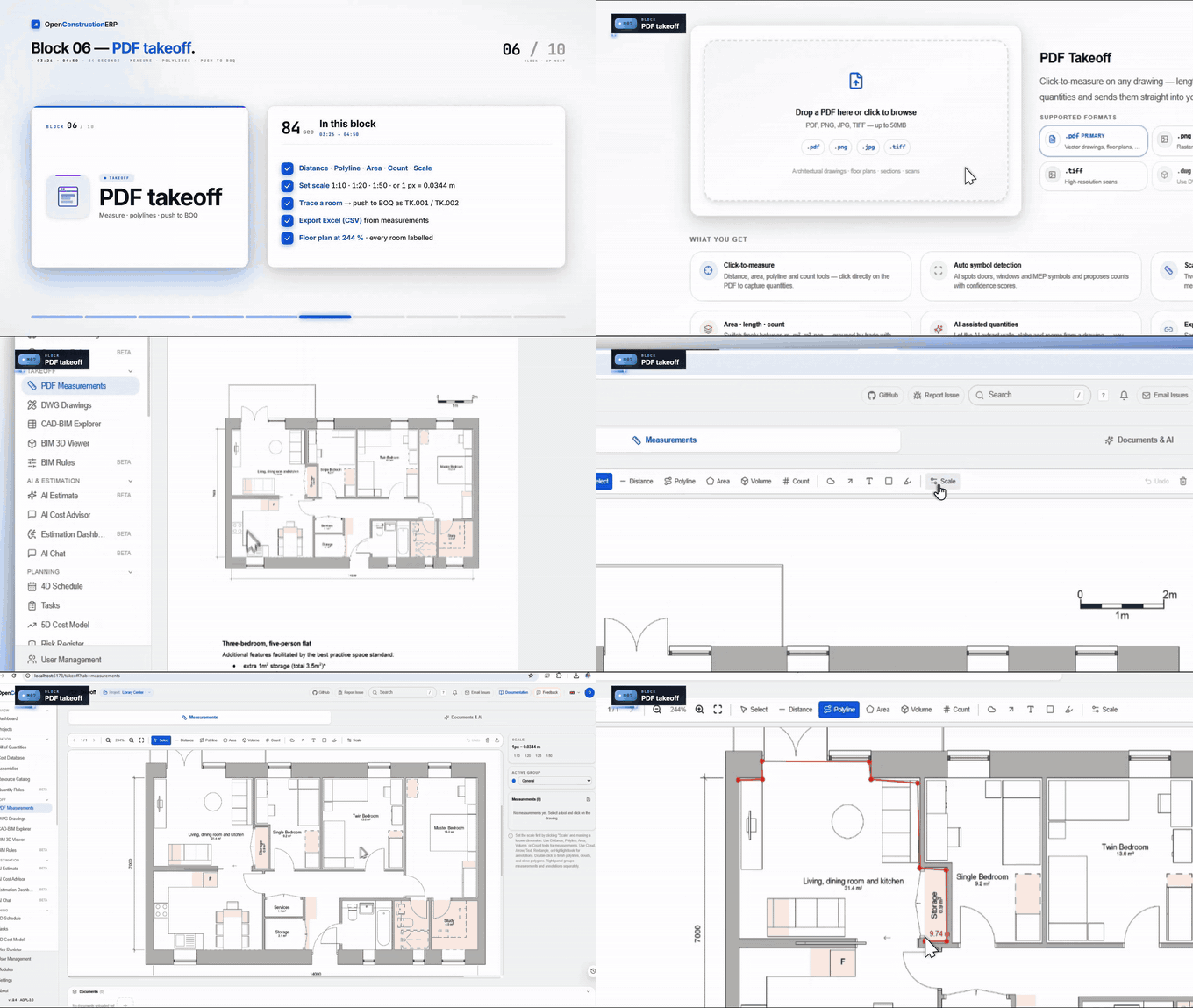
Extract quantities directly from your project drawings and models - no manual counting required. Upload RVT, IFC, DWG, or DGN files and the system extracts every building element with volumes, areas, and lengths. For PDF drawings, open them directly in the browser and use calibrated measurement tools to take off distances, areas, and element counts. All extracted quantities can be transferred to a BOQ for pricing.
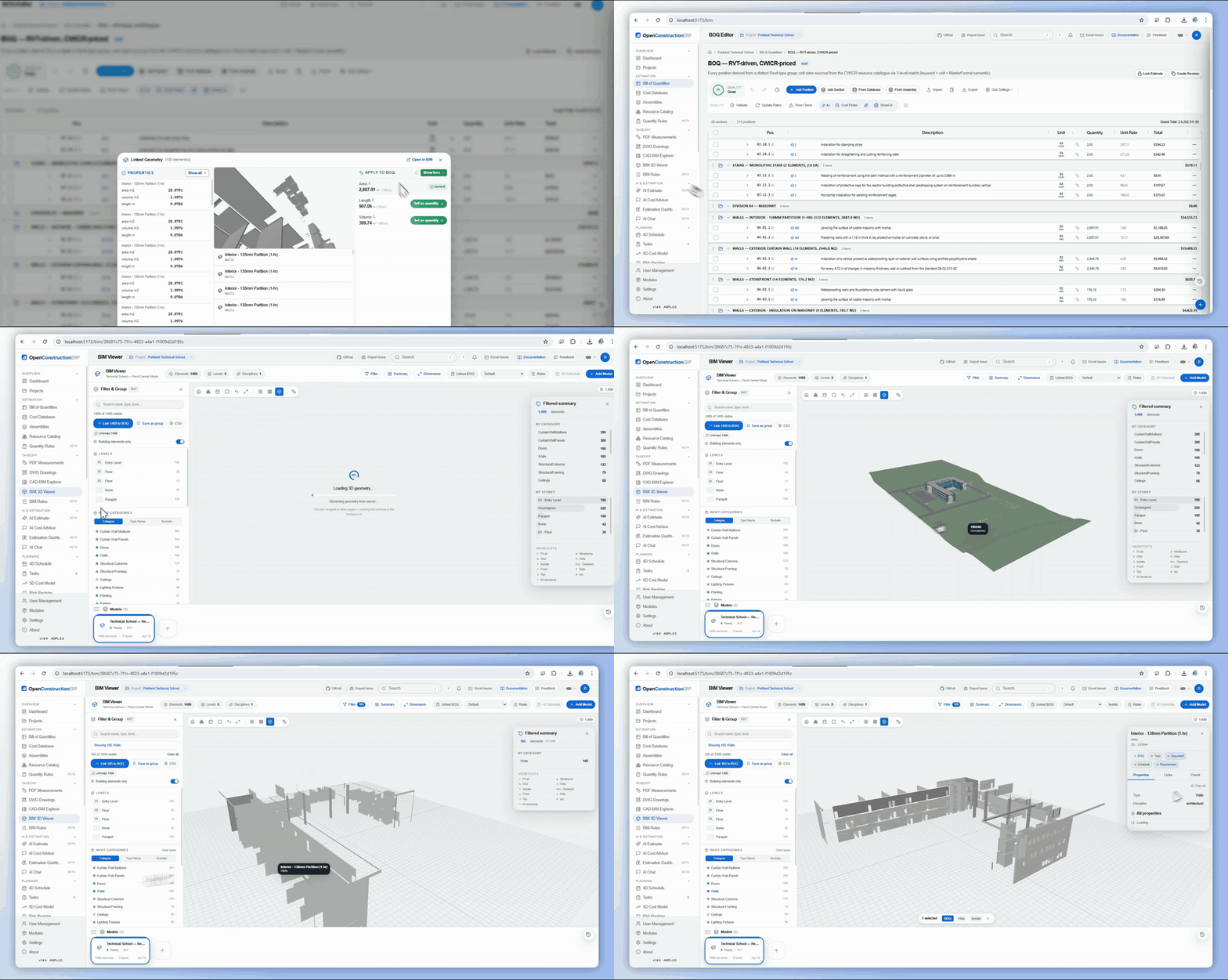
🎬 Watch the BIM → BOQ bulk-link, DWG layer takeoff and PDF measurement chapters on YouTube.

| Format | Software | Converter |
|---|---|---|
| .rvt / .rfa | BIM | DDC RvtExporter |
| .ifc | IFC (any BIM) | DDC IfcExporter |
| .dwg / .dxf | CAD | DDC DwgExporter |
| .dgn | CAD | DDC DgnExporter |
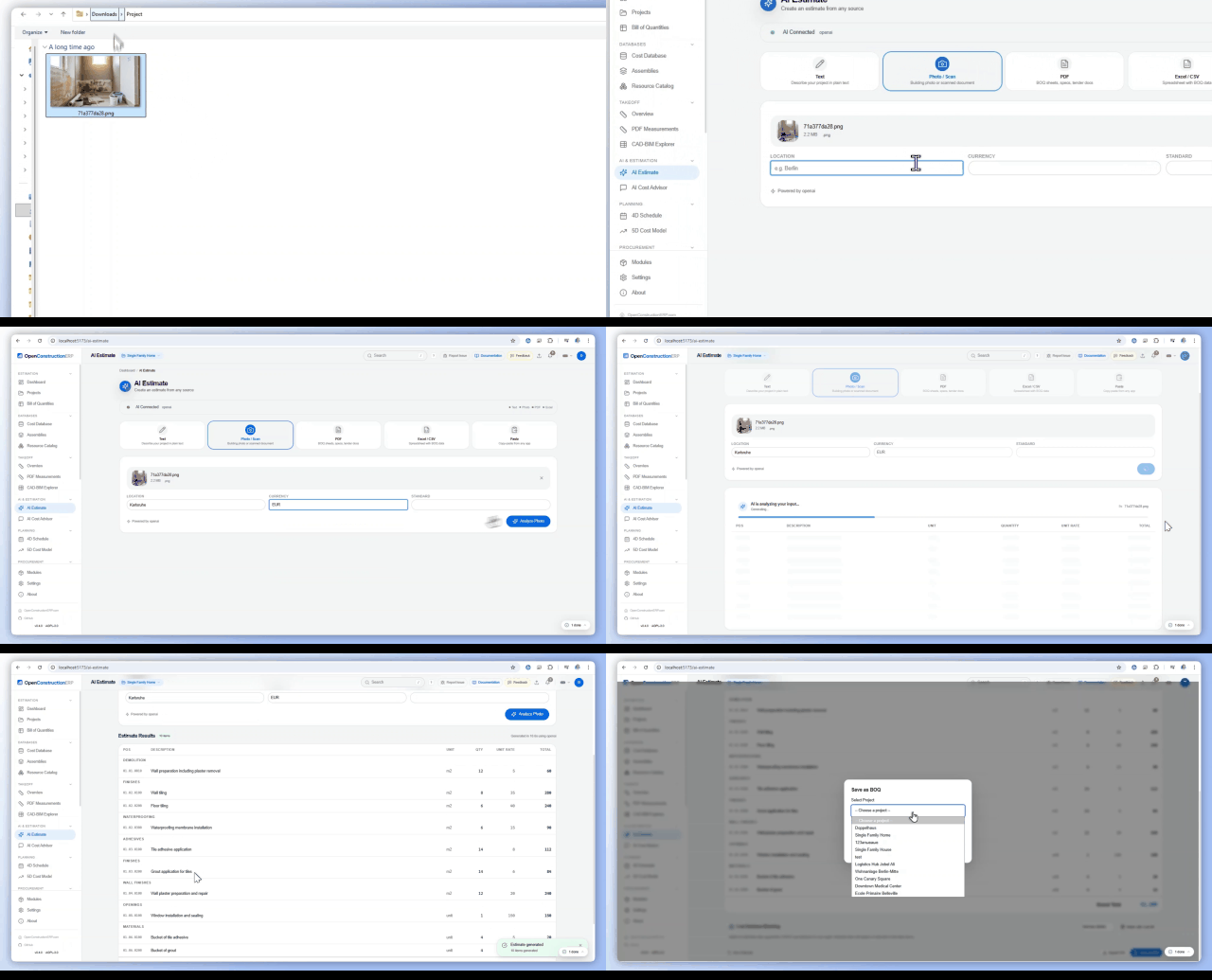
Connect any LLM provider to generate construction cost estimates from plain text descriptions, building photos, scanned PDFs, Excel spreadsheets, or CAD/BIM models. The AI system creates complete BOQ positions with quantities and market-rate pricing. After generation, you can match each item against the CWICR cost database to replace AI-estimated rates with verified regional market prices. AI features are entirely opt-in - the platform works fully without them.
🎬 See "AI estimate from a photo" on YouTube - upload a construction photo, get a scoped BOQ in seconds.

| Provider | Models | Features |
|---|---|---|
| Anthropic | Claude Sonnet / Opus | Text, vision, documents |
| OpenAI | GPT-4o | Text, vision, documents |
| Gemini Pro | Text, vision | |
| Mistral / Groq / DeepSeek | Various | Text |
Describe your project in plain text and AI generates 15-30 BOQ items with quantities and market rates.
Match AI estimates against CWICR database to replace guessed rates with real market prices.
Chat with AI about costs, materials, and pricing using your cost database as context.

Plan your construction project timeline and track costs over time with integrated scheduling and financial modeling tools.
The scheduling module provides a professional Gantt chart for managing your construction timeline. Create activities, set durations, define dependencies, and the system automatically calculates the critical path showing which activities must not be delayed.
The cost model connects your BOQ data to the project timeline, giving you a time-phased view of construction costs with Earned Value Management metrics.
Manage the complete procurement workflow from creating bid packages to comparing proposals and awarding contracts to subcontractors.
Navigate to Procurement, select a project, and click "Create Package". Specify the package name, scope description, submission deadline, and select which BOQ positions to include. You can create multiple packages per project (e.g., structural works, MEP, finishing).
Add bids from subcontractors with company name, contact details, and quoted prices for each BOQ position. The system supports multiple bids per package for side-by-side comparison.
The price mirror shows all bids in a comparison table with unit rates and totals per position. Visual indicators highlight the lowest and highest bids. Export the comparison as CSV for stakeholder review.
Mark the winning bid with the Award button and add justification notes. Package status tracks through: Draft, Issued, Collecting, Evaluating, Awarded, Closed.
Identify, assess, and manage project risks using a probability-impact matrix. Quantify risk exposure and plan mitigation strategies for each identified risk.
The matrix displays all risks on a probability (0.1-0.9) vs impact (low/medium/high/critical) grid with color coding. Each risk shows its calculated exposure score (probability multiplied by impact cost).
For each risk, document: unique code (R-001), title, category (technical, financial, schedule, regulatory, environmental, safety), mitigation strategy, contingency plan, risk owner, cost impact, and schedule impact in days. Track status through: Identified, Assessed, Mitigating, Closed, or Occurred.
Track scope changes and their impact on project cost and schedule. Change orders provide an audit trail of all modifications made after the initial estimate.
Create a change order with code (CO-001), title, and reason category (client request, design change, unforeseen condition, regulatory). Add line items specifying affected BOQ positions with original and new quantities/rates. The system calculates cost deltas automatically. Status moves through: Draft, Submitted, Under Review, Approved/Rejected.

Run automated quality checks on your BOQs to catch errors before they become problems. The validation engine applies 42 configurable rules against your estimate data.
Each validation produces a quality score (0-100%) with color-coded findings: Errors (red, must fix), Warnings (yellow, should review), Info (blue, suggestions). Click any finding to navigate directly to the affected BOQ position.

Generate professional documents from your project data for stakeholders, clients, and regulatory compliance.

Centralize all project documents. Upload drawings, contracts, specifications, and photos with automatic categorization and search.

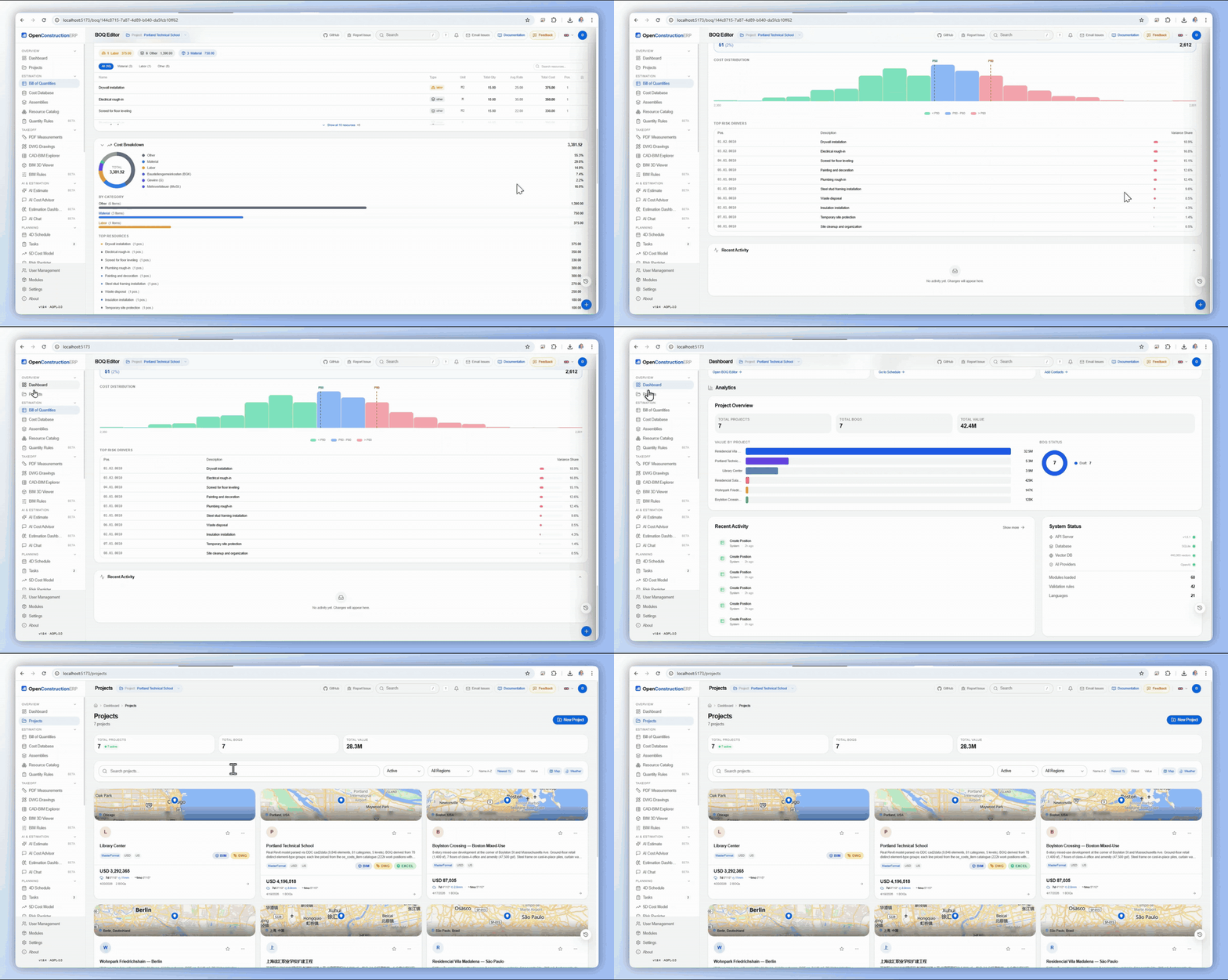
View cross-project budget performance. The dashboard aggregates financial data across all projects to identify trends, variances, and at-risk budgets.
Manage all project stakeholders in a centralized directory. Track clients, subcontractors, suppliers, architects, and consultants with full contact details, company associations, and role-based categorization. Link contacts to projects, tenders, purchase orders, and correspondence for full traceability.
| Method | Endpoint | Description |
|---|---|---|
| GET | /api/v1/contacts/ | List all contacts |
| POST | /api/v1/contacts/ | Create contact |
| GET | /api/v1/contacts/{id} | Get contact details |
| PUT | /api/v1/contacts/{id} | Update contact |
| POST | /api/v1/contacts/import | Bulk import contacts |
Organize project work with a 5-type task taxonomy and visual Kanban board. Tasks can be assigned to team members, linked to specific BOQ positions, documents, or RFIs, and tracked through customizable workflow stages. Each task type has its own color coding and default fields.
| Method | Endpoint | Description |
|---|---|---|
| GET | /api/v1/tasks/ | List tasks (filterable by project, assignee, status) |
| POST | /api/v1/tasks/ | Create task |
| PATCH | /api/v1/tasks/{id} | Update task (status, assignee, priority) |
| GET | /api/v1/tasks/board/{project_id} | Get Kanban board data |
Track formal information requests between project parties with ball-in-court assignment. RFIs flow through a structured lifecycle from draft to closed, ensuring every question gets a documented answer. Ball-in-court tracking shows who currently owns the action at any time.
| Method | Endpoint | Description |
|---|---|---|
| GET | /api/v1/rfis/ | List RFIs |
| POST | /api/v1/rfis/ | Create RFI |
| POST | /api/v1/rfis/{id}/respond | Submit response |
| PATCH | /api/v1/rfis/{id}/status | Update status / ball-in-court |
Full project financial management covering invoices, budgets, payments, and Earned Value Management (EVM). Track planned vs actual costs, generate payment applications, and monitor budget health with real-time variance analysis. Integrates with BOQ data for automatic cost baseline generation.
| Method | Endpoint | Description |
|---|---|---|
| GET | /api/v1/finance/invoices/ | List invoices |
| POST | /api/v1/finance/invoices/ | Create invoice |
| GET | /api/v1/finance/budgets/ | List budgets |
| POST | /api/v1/finance/budgets/import | Import budget from Excel |
| GET | /api/v1/finance/evm/{project_id} | Get EVM metrics |
| GET | /api/v1/finance/payments/ | List payments |
Manage purchase orders and goods receipts for construction materials and services. Create POs linked to BOQ positions, track delivery status, and record goods receipts with quantity verification. Integrates with the Contacts module for supplier management.
| Method | Endpoint | Description |
|---|---|---|
| GET | /api/v1/procurement/orders/ | List purchase orders |
| POST | /api/v1/procurement/orders/ | Create purchase order |
| POST | /api/v1/procurement/orders/{id}/receive | Record goods receipt |
| GET | /api/v1/procurement/receipts/ | List goods receipts |
Record safety incidents, near-misses, and behavioral observations with a risk scoring system. Track safety performance metrics across projects, identify trends, and ensure compliance with occupational health and safety regulations.
| Method | Endpoint | Description |
|---|---|---|
| GET | /api/v1/safety/incidents/ | List incidents |
| POST | /api/v1/safety/incidents/ | Report incident |
| GET | /api/v1/safety/observations/ | List observations |
| POST | /api/v1/safety/observations/ | Record observation |
| GET | /api/v1/safety/dashboard/{project_id} | Get safety KPIs |
Manage meeting minutes with structured agendas and tracked action items. Create recurring meeting series (e.g., weekly site meetings), record attendees, capture discussion points, and automatically generate action items that integrate with the Tasks module.
| Method | Endpoint | Description |
|---|---|---|
| GET | /api/v1/meetings/ | List meetings |
| POST | /api/v1/meetings/ | Create meeting |
| GET | /api/v1/meetings/{id}/minutes | Get meeting minutes |
| POST | /api/v1/meetings/{id}/actions | Add action item |
Conduct quality inspections using configurable checklists. Define inspection templates per trade or activity type, fill them out on-site, attach photos, and track deficiency resolution. Inspection results feed into the project quality score and NCR workflow.
| Method | Endpoint | Description |
|---|---|---|
| GET | /api/v1/inspections/ | List inspections |
| POST | /api/v1/inspections/ | Create inspection from template |
| GET | /api/v1/inspections/templates/ | List checklist templates |
| PATCH | /api/v1/inspections/{id}/items | Update checklist item results |
Document and track quality non-conformances when work does not meet specifications. NCRs follow a formal lifecycle from identification through root cause analysis to corrective action verification, ensuring all quality deviations are properly resolved and documented.
| Method | Endpoint | Description |
|---|---|---|
| GET | /api/v1/ncr/ | List NCRs |
| POST | /api/v1/ncr/ | Create NCR |
| PATCH | /api/v1/ncr/{id}/status | Update NCR status |
| POST | /api/v1/ncr/{id}/actions | Add corrective action |
Manage the submittal review process for construction materials, shop drawings, and product data. Track multi-stage review workflows where submittals pass through multiple reviewers before final approval. Maintain a complete audit trail of all review cycles and revision history.
| Method | Endpoint | Description |
|---|---|---|
| GET | /api/v1/submittals/ | List submittals |
| POST | /api/v1/submittals/ | Create submittal |
| POST | /api/v1/submittals/{id}/review | Submit review decision |
| POST | /api/v1/submittals/{id}/revise | Upload new revision |
Maintain a formal communication register for all project correspondence. Track letters, emails, notices, and instructions between project parties with unique reference numbers, response tracking, and full-text search. Ensures contractual communications are properly documented and traceable.
| Method | Endpoint | Description |
|---|---|---|
| GET | /api/v1/correspondence/ | List correspondence |
| POST | /api/v1/correspondence/ | Create correspondence entry |
| GET | /api/v1/correspondence/{id} | Get details with attachments |
| GET | /api/v1/correspondence/{id}/thread | Get linked correspondence chain |
A Common Data Environment aligned with ISO 19650 workflows for managing project information with controlled status transitions. Documents move through Work in Progress (WIP), Shared, Published, and Archived states with approval gates. Ensures information management follows BIM standards for collaborative delivery.
| Method | Endpoint | Description |
|---|---|---|
| GET | /api/v1/cde/documents/ | List CDE documents (filterable by status, suitability) |
| POST | /api/v1/cde/documents/ | Upload document to CDE |
| PATCH | /api/v1/cde/documents/{id}/status | Transition document status |
| GET | /api/v1/cde/documents/{id}/history | Get revision history |
Formally distribute documents to external parties with tracked delivery and acknowledgment. Create transmittal packages containing multiple documents, specify recipients, and track whether each recipient has received and acknowledged the documents. Provides a contractual record of information exchange.
| Method | Endpoint | Description |
|---|---|---|
| GET | /api/v1/transmittals/ | List transmittals |
| POST | /api/v1/transmittals/ | Create transmittal |
| POST | /api/v1/transmittals/{id}/send | Send transmittal to recipients |
| PATCH | /api/v1/transmittals/{id}/acknowledge | Record recipient acknowledgment |
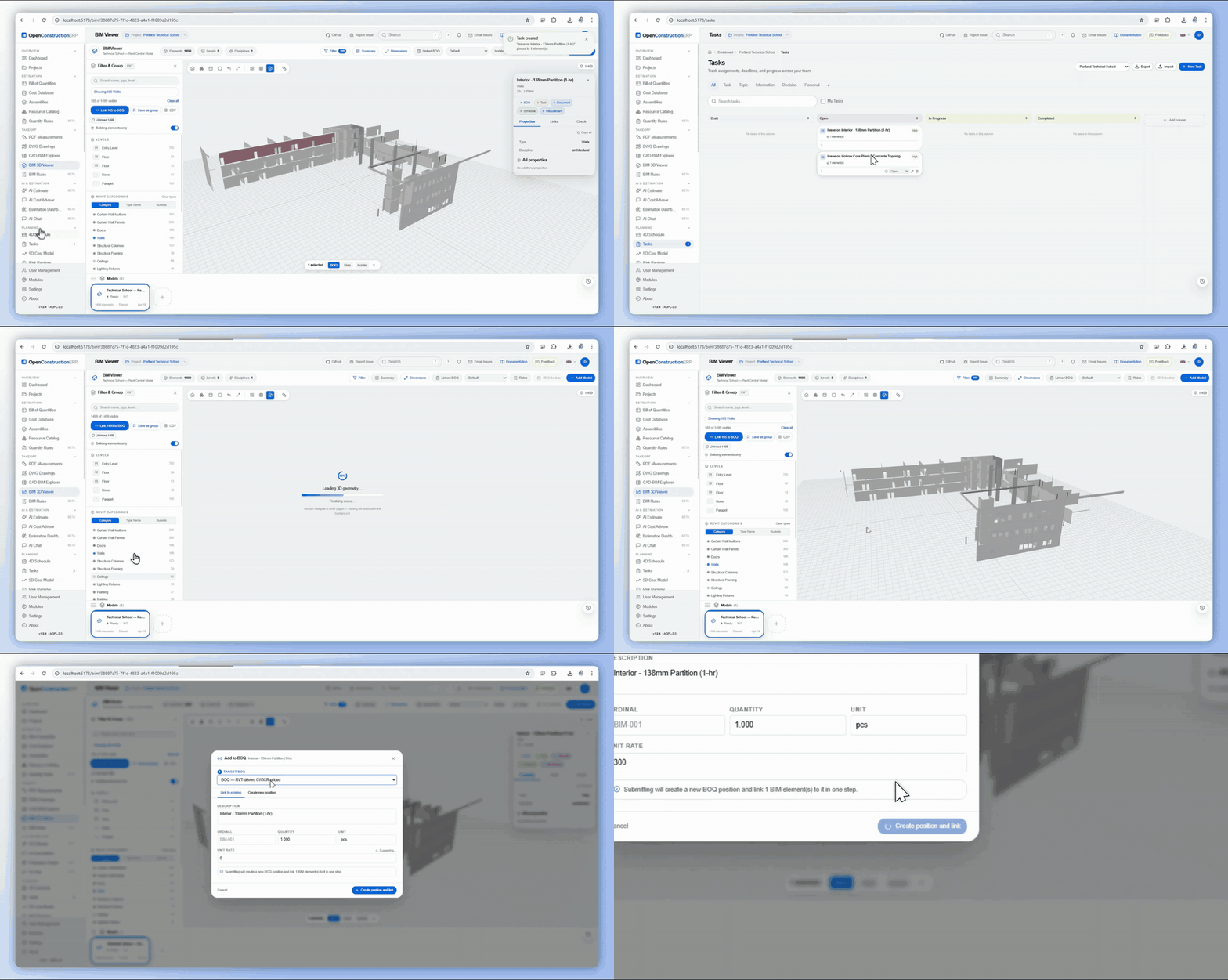
Central hub for BIM model management with element-level data access and direct BOQ linkage. Upload IFC/RVT models, browse building elements with their properties and quantities, and link elements to BOQ positions for 5D cost integration. Provides a bridge between design data and cost estimation.
🎬 BIM bulk-link demo on YouTube - 100 BIM walls → one BOQ line with aggregated area, volume and length.
| Method | Endpoint | Description |
|---|---|---|
| GET | /api/v1/bim/models/ | List BIM models |
| POST | /api/v1/bim/models/ | Upload BIM model |
| GET | /api/v1/bim/models/{id}/elements | List model elements |
| POST | /api/v1/bim/elements/{id}/link-boq | Link element to BOQ position |
Comprehensive reporting engine with a KPI dashboard, customizable report templates, and scheduled report generation. Aggregate data across projects for portfolio-level insights. Create custom report templates combining data from any module (BOQ, Finance, Schedule, Safety, Quality).
| Method | Endpoint | Description |
|---|---|---|
| GET | /api/v1/reporting/kpi/{project_id} | Get project KPIs |
| GET | /api/v1/reporting/templates/ | List report templates |
| POST | /api/v1/reporting/generate | Generate report from template |
| GET | /api/v1/reporting/portfolio/ | Get portfolio dashboard data |
In-app notification system that keeps users informed about events relevant to them. Notifications are triggered by actions across all modules - task assignments, RFI responses, submittal reviews, approval requests, overdue items, and more. Users control their notification preferences per category.
| Method | Endpoint | Description |
|---|---|---|
| GET | /api/v1/notifications/ | List notifications (unread first) |
| PATCH | /api/v1/notifications/{id}/read | Mark notification as read |
| POST | /api/v1/notifications/read-all | Mark all as read |
| GET | /api/v1/notifications/preferences | Get notification preferences |
Pure SVG-based Gantt chart for construction schedule visualization. Renders timelines, dependencies, milestones, and critical path directly in the browser without external libraries. Supports zooming from day-level to year-level views and exports to PDF/PNG for reporting.
| Method | Endpoint | Description |
|---|---|---|
| GET | /api/v1/schedule/gantt/{project_id} | Get Gantt chart data (activities, dependencies) |
| PATCH | /api/v1/schedule/activities/{id} | Update activity dates/progress |
| POST | /api/v1/schedule/dependencies/ | Create dependency |
Configure timezone, currency, number format, and date format preferences per user and per project. Regional settings cascade from system defaults to project-level overrides to user-level preferences, ensuring each team member sees data formatted according to their locale.
| Method | Endpoint | Description |
|---|---|---|
| GET | /api/v1/settings/regional/ | Get current regional settings |
| PUT | /api/v1/settings/regional/ | Update regional settings |
| GET | /api/v1/settings/regional/timezones | List available timezones |
| GET | /api/v1/settings/regional/currencies | List supported currencies |
Enable or disable platform modules to customize OpenConstructionERP for your workflow. Each module can be toggled independently without affecting other modules. Disabled modules are hidden from the UI, their API endpoints return 404, and their database tables remain intact for re-activation.
| Method | Endpoint | Description |
|---|---|---|
| GET | /api/v1/modules/ | List all modules with status |
| PATCH | /api/v1/modules/{name}/toggle | Enable or disable a module |
| GET | /api/v1/modules/{name}/dependencies | Check module dependencies |
Pre-configured regional packages that set up classification standards, tax rules, cost database defaults, report templates, and regulatory compliance rules for specific markets. Install a regional pack to immediately configure the platform for your country or region.
| Pack | Region | Standards | Currency |
|---|---|---|---|
| US | United States | MasterFormat, UniFormat, CSI | USD |
| DACH | Germany, Austria, Switzerland | DIN 276, GAEB, VOB, HOAI | EUR/CHF |
| UK | United Kingdom | NRM 1/2, RICS, JCT | GBP |
| Russia | Russia, CIS | GESN, FER, TER, SNIP | RUB |
| Middle East | UAE, Saudi Arabia, Qatar | RICS, CESMM, FIDIC | AED/SAR/QAR |
| Asia-Pacific | China, Japan, Australia | GB/T, AS 4000, JASS | CNY/AUD/JPY |
| India | India | CPWD, IS standards, DSR | INR |
| LatAm | Brazil, Mexico, Colombia | SINAPI, CMIC, local norms | BRL/MXN/COP |
| Method | Endpoint | Description |
|---|---|---|
| GET | /api/v1/regional-packs/ | List available regional packs |
| POST | /api/v1/regional-packs/{name}/install | Install regional pack |
| GET | /api/v1/regional-packs/{name}/details | Get pack contents and configuration |
Comprehensive data import and export capabilities across all modules. Import contacts, budgets, BOQs, and cost databases from Excel and CSV files with intelligent column mapping. Export project data to Excel, PDF, and CSV with customizable templates. All exports preserve formatting and include metadata headers.
| Method | Endpoint | Description |
|---|---|---|
| POST | /api/v1/import/contacts | Import contacts from file |
| POST | /api/v1/import/budget | Import budget from Excel |
| POST | /api/v1/export/boq/{id} | Export BOQ (format: excel, pdf, gaeb, csv) |
| POST | /api/v1/export/report | Generate and export report |

| Variable | Default | Description |
|---|---|---|
DATABASE_URL | (unset = embedded PostgreSQL) | Database (embedded PostgreSQL by default; set for external PostgreSQL). Leave unset to use the built-in embedded PostgreSQL, or set it to an external database, for example postgresql+asyncpg://oe:oe@localhost:5432/openestimate. |
JWT_SECRET | dev-key | JWT secret (change in production!) |
SEED_DEMO | true | Create demo accounts |
VECTOR_BACKEND | lancedb | Vector search backend |
OpenConstructionERP exposes a comprehensive REST API that powers the frontend and can be used for integrations, automation, and custom workflows. Every action available in the UI - creating projects, editing BOQs, running AI estimates, searching costs - is available as an API endpoint. Interactive Swagger documentation with try-it-out buttons is available at /api/docs when running the backend.
| Method | Endpoint | Description |
|---|---|---|
| POST | /api/v1/users/auth/login | Login |
| GET | /api/v1/projects/ | List projects |
| GET | /api/v1/boq/boqs/?project_id=... | List BOQs |
| GET | /api/v1/costs/?q=concrete | Search costs |
| POST | /api/v1/ai/quick-estimate | AI estimation |
| POST | /api/v1/takeoff/cad-extract | CAD extraction |
| GET | /api/health | Health check |
| Module | Prefix | Description |
|---|---|---|
| Contacts | /api/v1/contacts/ | Contacts directory CRUD, import |
| Tasks | /api/v1/tasks/ | Task management, Kanban board |
| RFI | /api/v1/rfis/ | Requests for Information |
| Finance | /api/v1/finance/ | Invoices, budgets, payments, EVM |
| Procurement | /api/v1/procurement/ | Purchase orders, goods receipts |
| Safety | /api/v1/safety/ | Incidents, observations, risk scoring |
| Meetings | /api/v1/meetings/ | Minutes, agenda, action items |
| Inspections | /api/v1/inspections/ | Quality inspections, checklists |
| NCR | /api/v1/ncr/ | Non-conformance reports |
| Submittals | /api/v1/submittals/ | Multi-stage submittal review |
| Correspondence | /api/v1/correspondence/ | Communication register |
| CDE | /api/v1/cde/ | ISO 19650 document environment |
| Transmittals | /api/v1/transmittals/ | Document distribution |
| BIM Hub | /api/v1/bim/ | BIM models, elements, BOQ linkage |
| Reporting | /api/v1/reporting/ | KPI dashboard, report templates |
| Notifications | /api/v1/notifications/ | In-app notification system |
| Comments | /api/v1/comments/ | Threaded comments on any entity |
| Gantt | /api/v1/schedule/gantt/ | SVG schedule visualization |
| Regional | /api/v1/settings/regional/ | Timezone, currency, format prefs |
| Modules | /api/v1/modules/ | Enable/disable modules |
| Regional Packs | /api/v1/regional-packs/ | Install regional configurations |
| Import/Export | /api/v1/import/ / /api/v1/export/ | Bulk data import and export |
See each module section above for detailed endpoint documentation with parameters and descriptions.
AI-powered project analysis that scores your project across 9 weighted domains and generates a completeness score from 0 to 100 (grades A through F).
API: GET /api/v1/project_intelligence/score/?project_id=X - returns overall score, domain scores, critical gaps, and achievements.
Manage team members, roles, and per-module access control.
Admins can configure per-user module visibility and access levels (None, View, Edit, Full) via the /users page. Custom role names can be assigned (e.g., "Site Engineer", "Cost Manager").
Star the repository to help others discover the project.
Subscribe for release walkthroughs and tutorials. Start with the 12-min product walkthrough.
Open an issue on GitHub.
Join Telegram community to ask questions.
Contact us for deployment and training.
License: AGPL-3.0. Commercial licensing: info@datadrivenconstruction.io
Comments
Threaded comment system that can be attached to any entity in the platform - BOQ positions, tasks, RFIs, submittals, documents, inspections, and more. Supports @mentions to notify team members, file attachments, and resolution tracking for action-oriented discussions.
Key Features
API Endpoints
/api/v1/comments/?entity_type=task&entity_id=.../api/v1/comments//api/v1/comments/{id}/reply/api/v1/comments/{id}/resolve