What changed
- The DDC converters run on Linux and macOS, and every conversion has a 30 minute limit.
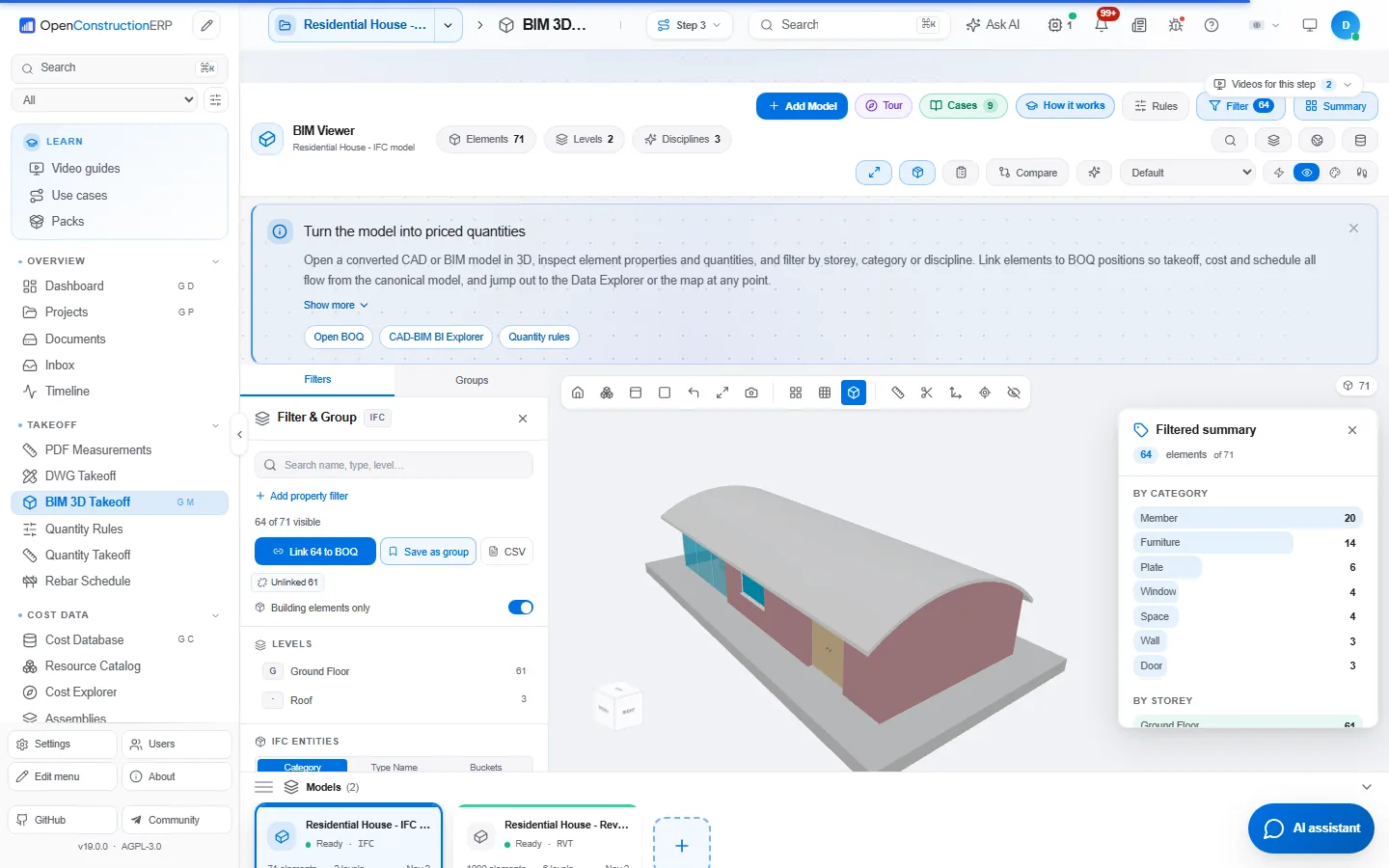
- RVT models come with their identity, parameters and quantities, read from the converter's own element table, in metres.
- DWG takeoff shows the drawing size at the current scale and the converter's own error when a drawing fails, and draws elliptical arcs as arcs.
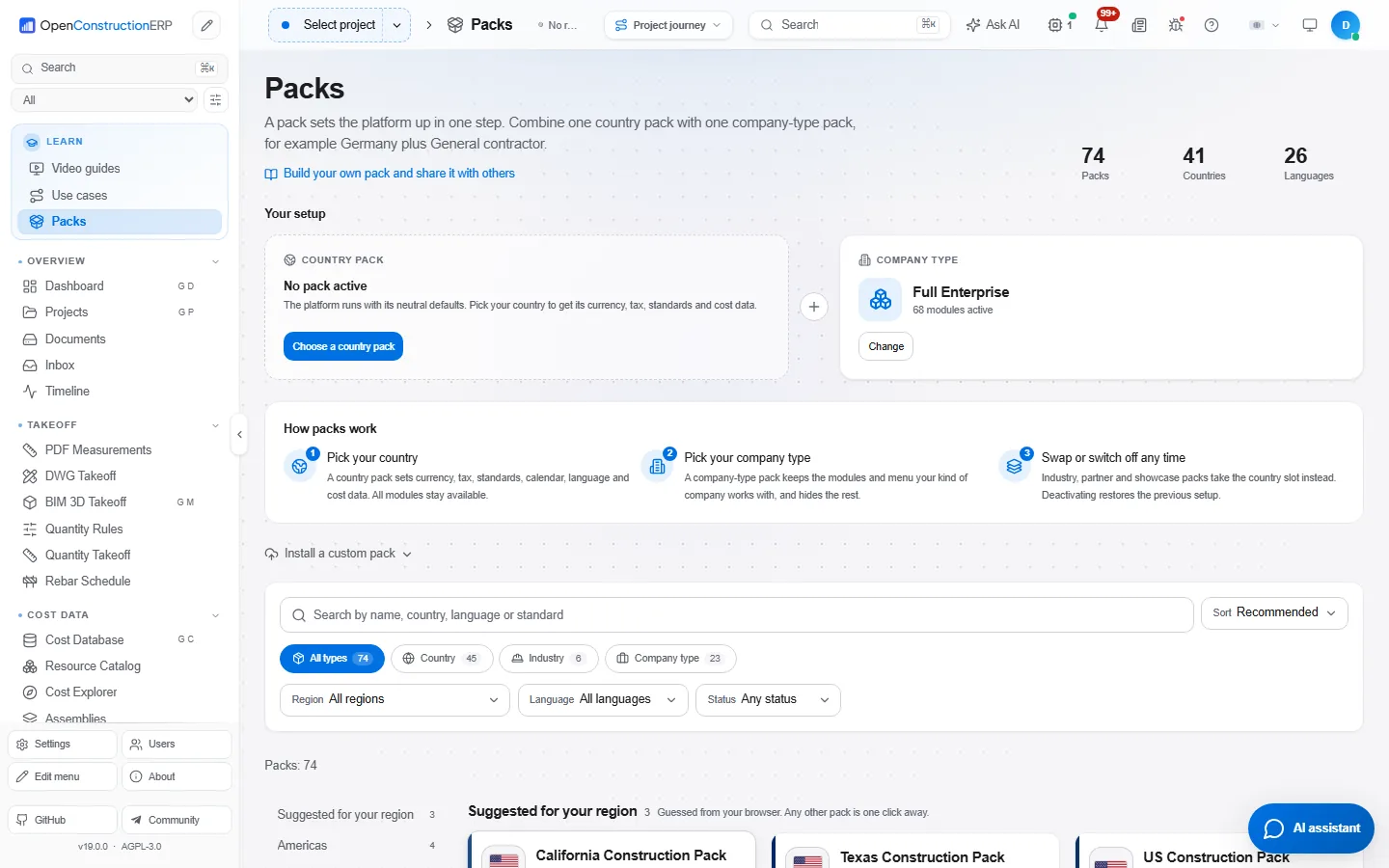
- Packs have their own page with filters and a page per pack, linked from the Learn block and the command palette.
- Procurement shows requisition coverage, and contracts get South Africa payment defaults for the PFMA and MFMA regimes.
- STACKIT Terraform modules set up one isolated instance per company, with a deployment guide in English, German and Russian.
Screenshots show the current release, 19.0.0.
Full release notes
OpenConstructionERP 18.8 replaces the converters behind RVT, IFC and DWG import and checks every download before it is unpacked. PDF drawings are read with a faster engine, and Settings gains appearance styles, a menu look and ready profiles for background services. The Packs page makes the choice of country and company type packs easier to see.
What is in version 18.8.0
- New generation of DDC converters. CAD and BIM conversion uses the converters published in the 2026.10 release of datadrivenconstruction/cad2data-Revit-IFC-DWG, and they run offline on Windows 10/11 x64, Linux (x64 and arm64) and macOS (Intel and Apple silicon). The installer picks the package for the server's operating system and processor and checks its SHA-256 against the digest pinned in the build and the one in the release's checksum file before unpacking it. A conversion may run up to 30 minutes, and the screen shows each stage while it works.
- Richer RVT, IFC and DWG results. RVT models come with the converter's GLB mesh and an element table with levels, types, parameters in metres and quantity sets; analytical model elements are left out. IFC models come as property and quantity tables, and since the IFC converter writes no geometry the viewer shows placeholder boxes as before. DWG drawings are converted to DXF and go through the DXF path. The converter version check now compares the installed package with the one this version installs, offline.
- Appearance styles in Settings. Five ready styles, plus your own accent colour (seven, all readable in light and dark), font (Inter, IBM Plex Sans, Source Sans 3 or the system font), density and corners. The look applies at once, survives a reload without flashing, and an administrator can save it as the default for the whole workspace. The fonts ship with the platform, so it works offline.
- Menu look. Five menu views (Classic, Compact, Comfortable, an icon rail and a floating panel), the active item shown as a bar, pill or tint, three icon weights, and icons that are plain, tiled or circled. Colour can be the accent or one per section, or you can show labels only. Six ready sets (Classic, Studio, Blueprint, Site office, Executive, Focus) preview on hover, any menu item can take another icon from a searchable picker, and an administrator can save the look as the workspace default.
- Ready profiles for background services. Maximum speed, Balanced and Maximum features, each with its estimated memory and number of services. The active profile is recognised, manual changes show as Custom, Maximum features warns when the server may not have enough memory, and only administrators can switch.
- A Packs page. Country packs and company type packs sit side by side, with search and filters by type, region, language and status. The two active packs show at the top and can be changed, and a page per pack shows what activating it will change before you confirm.
- A new PDF engine. PDF drawings, scans and documents are read with pypdfium2. Takeoff and recognition results stay the same, a large floor plan opens about eight times faster with less memory, and text from bills of quantities comes out cleaner. SVG logos now print on PDF forms.
- Requisitions that follow the BOQ. The buy list shows for every BOQ source how much is already on requisitions and how much remains, and a new requisition starts from the remainder. Going over the BOQ quantity asks for a reason, a requisition whose lines no longer match their sources cannot be submitted, and lines show an indicative unit cost from the BOQ rates.
- South Africa contract defaults. Retention, payment period, valuation interval and certificate name for the JBCC, NEC and GCC forms, plus the 30 day payment rules for public bodies under the PFMA and the MFMA.
- One instance per company on STACKIT. Terraform modules deploy an isolated platform with its own cluster, database and certificates for each company, with a guide in English, German and Russian.
- Change orders know about variation orders. A new standalone change order on a project with active variation orders shows them first, so you can link it or continue on purpose.
- Removed. DGN conversion, because the new generation has no converter for it, and the Linux apt/.deb converter installer. The NOTICE no longer describes a third-party CAD SDK or Qt inside the Windows installer.
Fixes
Converters install again after their packages were republished upstream, and a package missing from the release is named instead of failing as unavailable. A conversion that fails or times out now says why, instead of reporting the converter as not installed. Permit and site logistics notifications show translated text instead of raw keys, and dismissing a notification that is already gone no longer shows an error.
If converters stopped installing
The converter packages were republished upstream, so very old versions
(up to 15.4) can no longer find them. Update to 18.8.0. If you cannot update
yet, set OE_CONVERTER_BRANCH=45498426fd225c36a2a2a3a67993fd39c5d9d0ff
and restart the platform.
On versions 16.1 to 18.7 the update check may show the converters as offline.
Set OE_CONVERTER_REPO=datadrivenconstruction/cad2data-Revit-IFC-DWG
and restart, or update to 18.8.0, which already points there.
Install or upgrade
pip install openconstructionerp==18.8.0
With Docker, run docker compose pull app && docker compose up -d in your install folder to move to 18.8.0.
Desktop installers for Windows, macOS and Linux are on openconstructionerp.com/download. The full list of changes for each version is in the release notes on GitHub. The macOS build is for Apple Silicon only. On an Intel Mac, install with pip or Docker. Questions or trouble upgrading, write to info@datadrivenconstruction.io.
Tell us how it went
If you have installed or tested OpenConstructionERP, we would like to hear what happened, including the parts that did not work. Open an issue on GitHub or write to info@datadrivenconstruction.io.
Try v18.8.0 today.
Live demo in your browser, or self-host in five minutes. AGPL-3.0, no signup required.