

BIM 与工程量计算
Get 6D carbon from a BIM model
Turn a converted BIM model into an embodied carbon footprint. Auto-enrich reads quantities…
5 个步骤12 分钟打开
 ENEnglish
 DEDeutsch
 FRFrançais
 ESEspañol
 ES-MXEspañol (México)
 ITItaliano
 PTPortuguês
 NLNederlands
 PLPolski
 CSČeština
 RUРусский
 BGБългарски
 TRTürkçe
 SVSvenska
 NONorsk
 FISuomi
 DADansk
 ARالعربية
 ZH中文
ZH中文 JA日本語
JA日本語 KO한국어
KO한국어 HIहिन्दी
 THไทย
THไทย VITiếng Việt
 IDBahasa Indonesia
 RORomână
 HRHrvatski
 MNМонгол
 ETEesti
 BNবাংলা
 KKҚазақша
 KYКыргызча
 FILFilipino
 URاردو
 FAفارسی
 HEעברית
 ELΕλληνικά
打开信息需求, 对照它检查交付的模型在命名、分类、细节层级和必需属性上的符合情况, 对每个缺口提出BCF问题, 只对通过的部分签认。
贯穿平台的 4 个步骤 - 每一步做什么,以及为什么重要。
打开模型应满足的信息需求: 命名规则、分类、信息需求层级, 以及每个构件必须承载的属性。
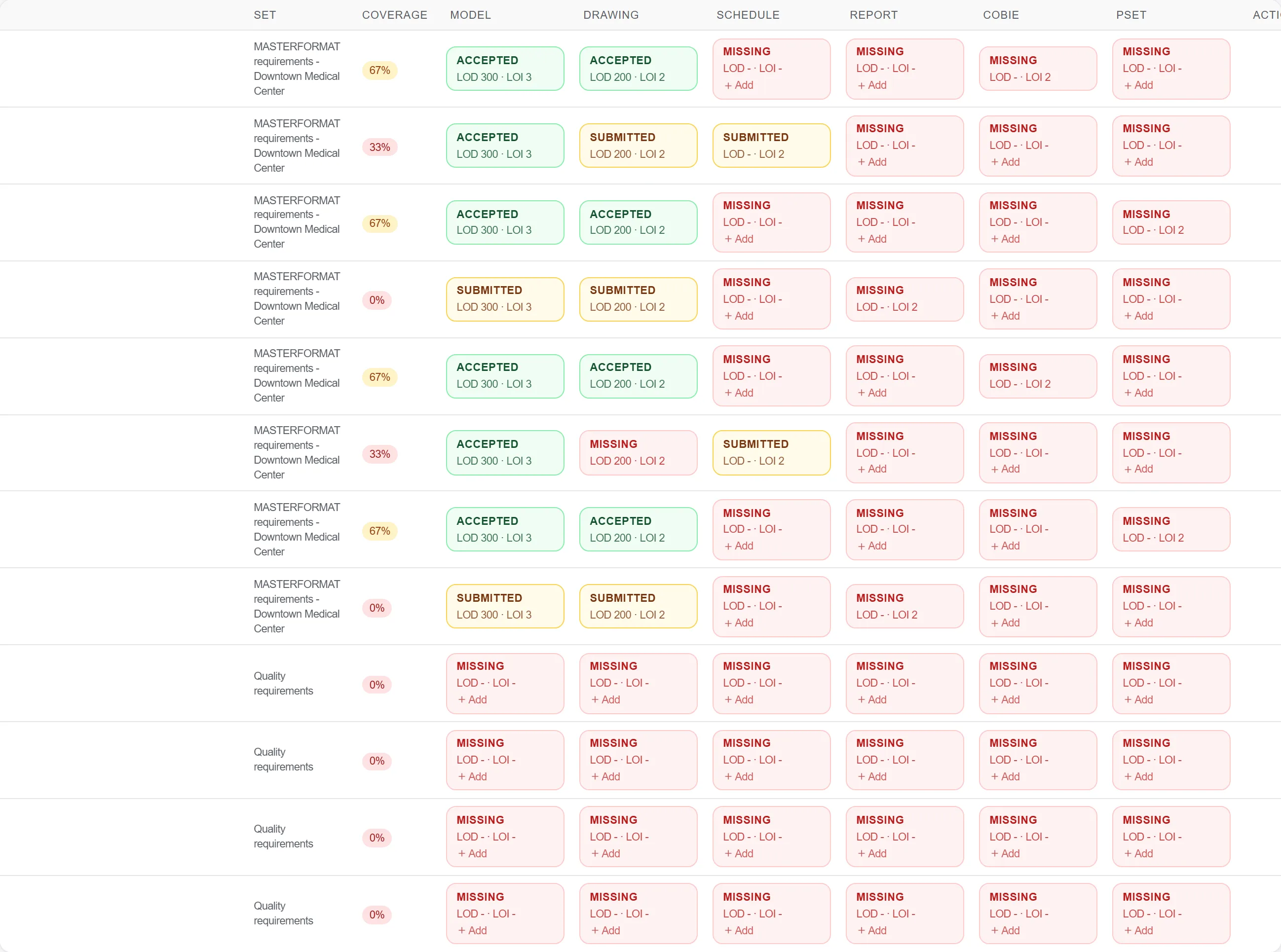
原因: 你无法对照一份没打开过的标准去检查模型。从真实需求出发, 才能把一次含糊的审查变成对每一点明确的通过或不通过。
逐项检查模型, 对照需求核对命名、分类编码、细节层级以及每类构件上的必需属性。

原因: 缺失的分类或空白的属性字段会在下游破坏工程量计算和资产移交。在交付时发现它, 远比等到需要时才发现便宜得多。
对照需求为每个缺口提出一个BCF问题, 指向具体构件并说明缺什么, 让作者拿到一份精确的整改清单。

原因: 精确的问题会被修好, 含糊地抱怨模型不合规则只会招来争辩。把每个问题绑定到一项需求和一个构件, 就消除了争论空间。
只有在模型真正满足某项需求后才对其签认, 使矩阵记录的是真实的验收而非一厢情愿的勾选。

原因: 签认是保护所有下游各方的关口。坚持到模型真正合规才签认, 才能避免数据缺口被估价人和运营方承接。
190 个平台模块中的 3 个
Turn a converted BIM model into an embodied carbon footprint. Auto-enrich reads quantities…
Load a converted model, lift the element quantities straight off the geometry, carry them i…
Load a DWG, lock the scale against a known dimension, measure the areas, lengths and counts…
