

BIMと数量拾い
Get 6D carbon from a BIM model
Turn a converted BIM model into an embodied carbon footprint. Auto-enrich reads quantities…
5ステップ12 分開く
 ENEnglish
 DEDeutsch
 FRFrançais
 ESEspañol
 ES-MXEspañol (México)
 ITItaliano
 PTPortuguês
 NLNederlands
 PLPolski
 CSČeština
 RUРусский
 BGБългарски
 TRTürkçe
 SVSvenska
 NONorsk
 FISuomi
 DADansk
 ARالعربية
 ZH中文
ZH中文 JA日本語
JA日本語 KO한국어
KO한국어 HIहिन्दी
 THไทย
THไทย VITiếng Việt
 IDBahasa Indonesia
 RORomână
 HRHrvatski
 MNМонгол
 ETEesti
 BNবাংলা
 KKҚазақша
 KYКыргызча
 FILFilipino
 URاردو
 FAفارسی
 HEעברית
 ELΕλληνικά
干渉プロファイル、すなわちどの要素群をどれに照らして検査するか、どの公差でかを定義し、統合モデルに対して実行し、ヒットを本物の干渉まで振り分け、修正すべき課題として押し出す。
プラットフォーム全体で4ステップ - 各ステップで何をするか、そしてなぜ重要か。
プロファイルを設定する。どの要素群をどれに照らすか、ダクト対構造、配管対ダクト、そして本物のヒットとみなす公差である。
理由: プロファイルが、検査を有用にするか雑音にするかを決める。正しい群を組み合わせ実のある公差を設定することが、結果を人が実際に解決すべき干渉にとどめる。
プロファイルを統合モデルに対して実行し、設定した公差を超えるすべてのヒットを、消し込める状態で一覧化させる。

理由: 定義したプロファイルで実行することが結果を再現可能にする。設計更新後の次の実行が比較可能になり、調整が良くなっているか悪くなっているかを把握できる。
ヒットをまとめ、重複と無害なかすりを落とし、設計変更を要する本物の干渉を残し、レビューが短い本物のリストを処理するようにする。
理由: 千件の偽干渉をかき分けねばならないチームは、報告を読むのをやめる。本物へ振り分けることが、干渉検出を無視されるのではなく信頼されるものに保つ。
本物の干渉を、視点と担当者つきのBCF課題に変え、解決まで追跡され、次の実行で再び現れないようにする。
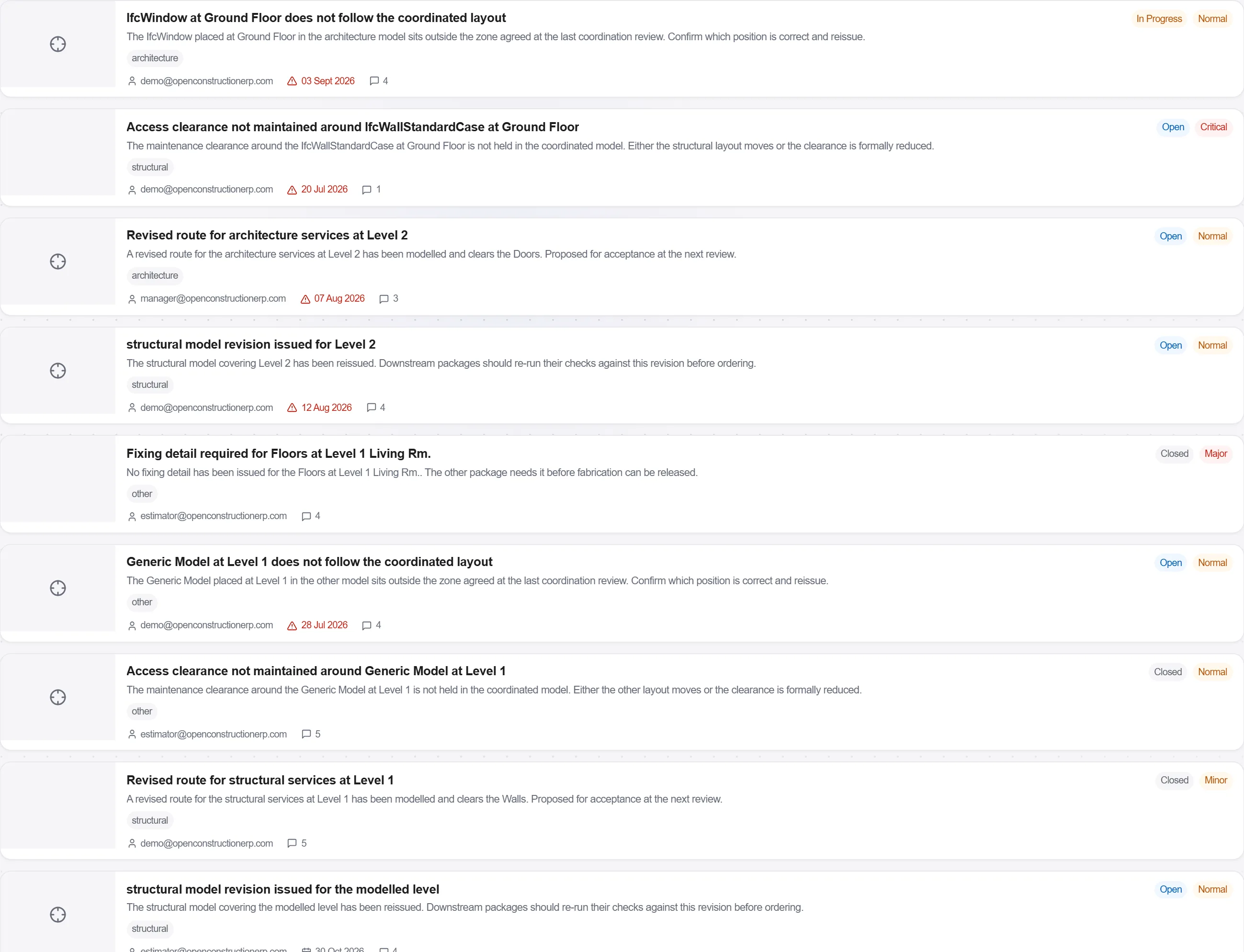
理由: 割り当てられない干渉は、残る干渉だ。本物のものを担当者つきの課題として押し出すことが、監査と解決済みの問題を分ける。
プラットフォーム 190 モジュール中 3 個
Turn a converted BIM model into an embodied carbon footprint. Auto-enrich reads quantities…
Load a converted model, lift the element quantities straight off the geometry, carry them i…
Load a DWG, lock the scale against a known dimension, measure the areas, lengths and counts…
