
Kustannuslaskenta ja kustannukset
Check an estimate before you send it
Put a priced bill through the validation rules, clear every warning and error, then export…
3 vaihetta8 minAvaa
 ENEnglish
 DEDeutsch
 FRFrançais
 ESEspañol
 ES-MXEspañol (México)
 ITItaliano
 PTPortuguês
 NLNederlands
 PLPolski
 CSČeština
 RUРусский
 BGБългарски
 TRTürkçe
 SVSvenska
 NONorsk
 FISuomi
 DADansk
 ARالعربية
 ZH中文
ZH中文 JA日本語
JA日本語 KO한국어
KO한국어 HIहिन्दी
 THไทย
THไทย VITiếng Việt
 IDBahasa Indonesia
 RORomână
 HRHrvatski
 MNМонгол
 ETEesti
 BNবাংলা
 KKҚазақша
 KYКыргызча
 FILFilipino
 URاردو
 FAفارسی
 HEעברית
 ELΕλληνικά
Mittaa piirustukselta, kohdista määrä laskelman nimikkeeseen, anna nimikkeelle sen GB 50500 -koodi ja kuvaus siitä, mitä se kattaa, ja validoi koodit ennen laskelman lähettämistä.
5 vaihetta läpi alustan - mitä teet kussakin ja miksi sillä on merkitystä.
Open the sheet, set the scale against a dimension printed on the drawing, and measure the areas, lengths and counts you need. The measurements stay on the sheet where they were taken.
Miksi: A measurement you can point at on the drawing is checkable by somebody else in a minute. The same number in a spreadsheet cell is only as good as the memory of whoever put it there, and on a revision it has to be redone from scratch because nobody can see what it covered.
Group the measurements into the quantities the bill will actually carry, in the units the measurement rules give for each kind of work, and check the totals against anything you already know about the building.
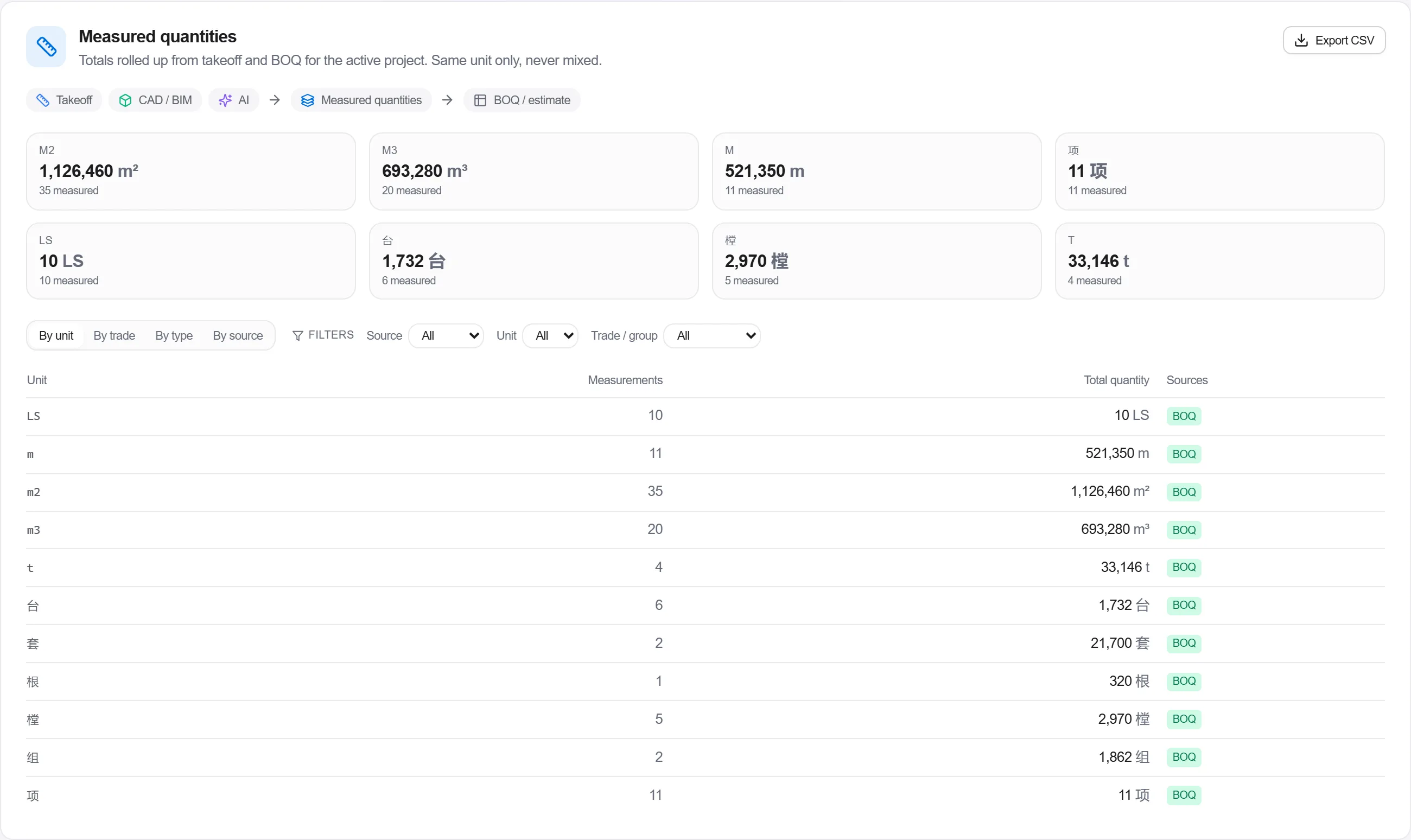
Miksi: The unit is part of the measurement rule, not a formatting choice, and a quantity carried in the wrong one produces a rate that is wrong by a factor rather than by a margin. It is also the last cheap moment to notice that a floor is missing from the take-off.
Put the quantity on a bill item under the right section and give the item its code. The national schedule gives nine digits; a project bill extends that with a three-digit sequence of its own, so a code of either length is what the bill ends up carrying.

Miksi: The code is the item's identity for the rest of the job. It is what lets a settlement bill be compared against a tender bill after both have been renumbered, and it is what lets two bidders' prices for the same work be set against each other at all.
Beside the code, write out what the item actually covers: grade, mix, thickness, finish, method, and anything about access or sequence that changes the price. It is free text, so it can say whatever the item needs it to say.
Miksi: The characteristics are what the code cannot carry, and they differ for every kind of work: what you must state for concrete is nothing like what you must state for windows. An item described in three words gets priced three different ways by three bidders, and the difference becomes yours to absorb at settlement.
Run validation on the bill. For a project in China the GB 50500 rules are selected for you: they find items carrying no code at all, and codes that are not a well-formed nine or twelve digits. If your bill form also has a code column of its own, make sure the code being checked is the one on the item rather than a second copy typed elsewhere.
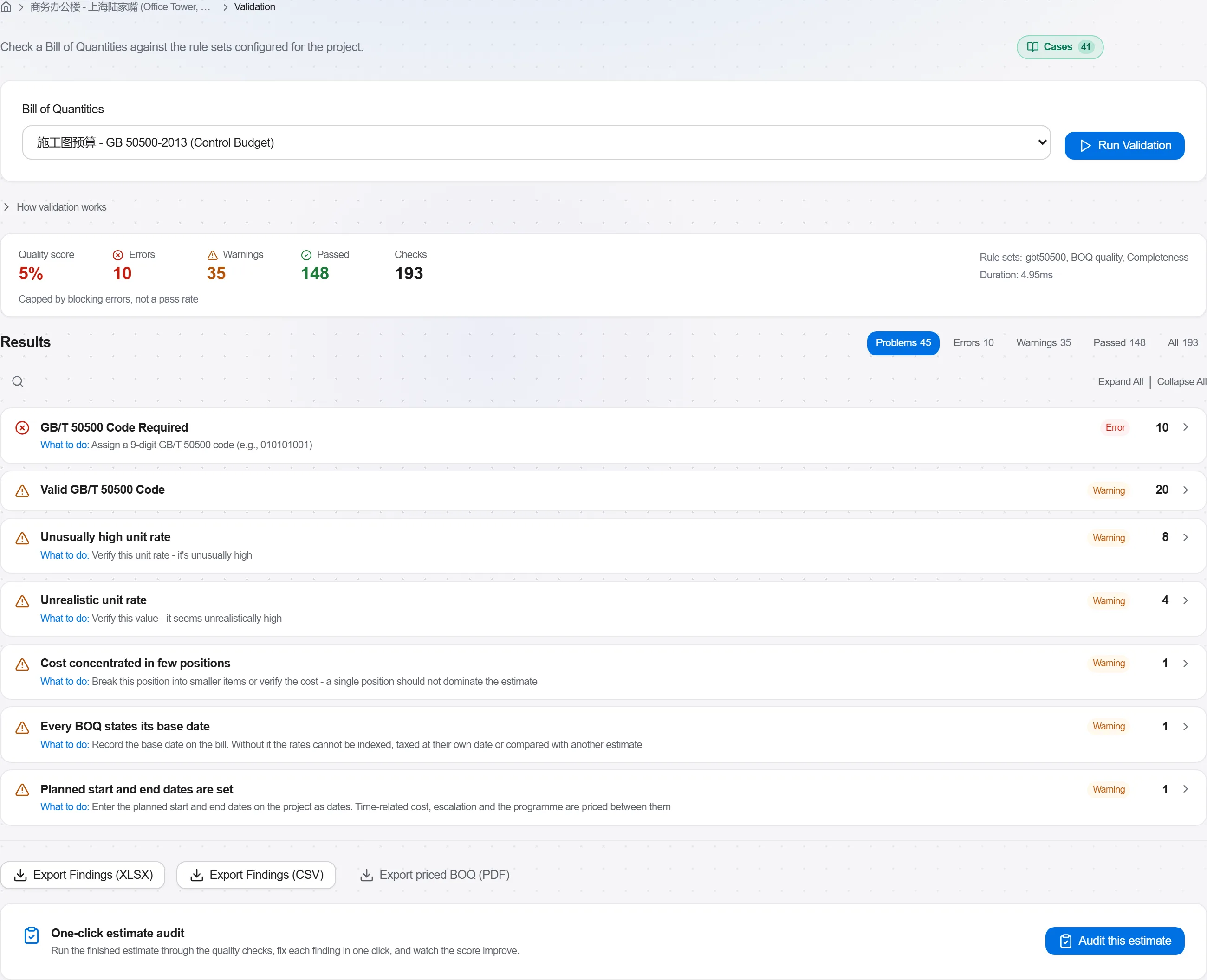
Miksi: This checks the shape of the code, not whether that code exists in the national schedule, so a well-formed number nobody ever published passes. Read a clean run as having cleared the typing errors, and read the codes yourself for the ones that matter.
4 / 190 alustan moduulia
Everything in this case follows how construction work is measured, priced and paid for in this market. The forms, the cost breakdown and the payment rules are the ones used there, not a generic version of them.
Standards it follows
You do not have to set any of that up by hand. The first time you open the platform it asks which market you work in. Choose this one and it sets the interface language, loads the matching cost database and records the cost classification, and it adds an example project you can open straight away.
The rule checks for this market come with the platform too. Switch them on once and an estimate that misses something the market expects is flagged while you are still working on it, not after the tender has gone out.
Put a priced bill through the validation rules, clear every warning and error, then export…
Pull priced items from a real cost database, build the bill from them, bundle recurring bui…
Turn a single-point estimate into a range, run a Monte Carlo over the genuinely uncertain l…
