
Planlegging og styring
Set up a project and hand it over
Take a job from the very first setup right through to handover. Create it, price the work,…
5 trinn20 minÅpne
 ENEnglish
 DEDeutsch
 FRFrançais
 ESEspañol
 ES-MXEspañol (México)
 ITItaliano
 PTPortuguês
 NLNederlands
 PLPolski
 CSČeština
 RUРусский
 BGБългарски
 TRTürkçe
 SVSvenska
 NONorsk
 FISuomi
 DADansk
 ARالعربية
 ZH中文
ZH中文 JA日本語
JA日本語 KO한국어
KO한국어 HIहिन्दी
 THไทย
THไทย VITiếng Việt
 IDBahasa Indonesia
 RORomână
 HRHrvatski
 MNМонгол
 ETEesti
 BNবাংলা
 KKҚазақша
 KYКыргызча
 FILFilipino
 URاردو
 FAفارسی
 HEעברית
 ELΕλληνικά
Hindre at en langlevert vare stanser jobben: finn varene hvis levering slår fremdriftsplanen, knytt bestillingsdatoene deres til planen, og rapporter eksponeringen som gjenstår.
3 trinn gjennom plattformen - hva du gjør i hvert og hvorfor det betyr noe.
Gå gjennom innkjøpsplanen for varene hvis leveringstid er lang mot fremdriftsplanen, fra koblingsanlegg til spesialtilpassede fasader, og noter datoen hver faktisk trengs på plassen.
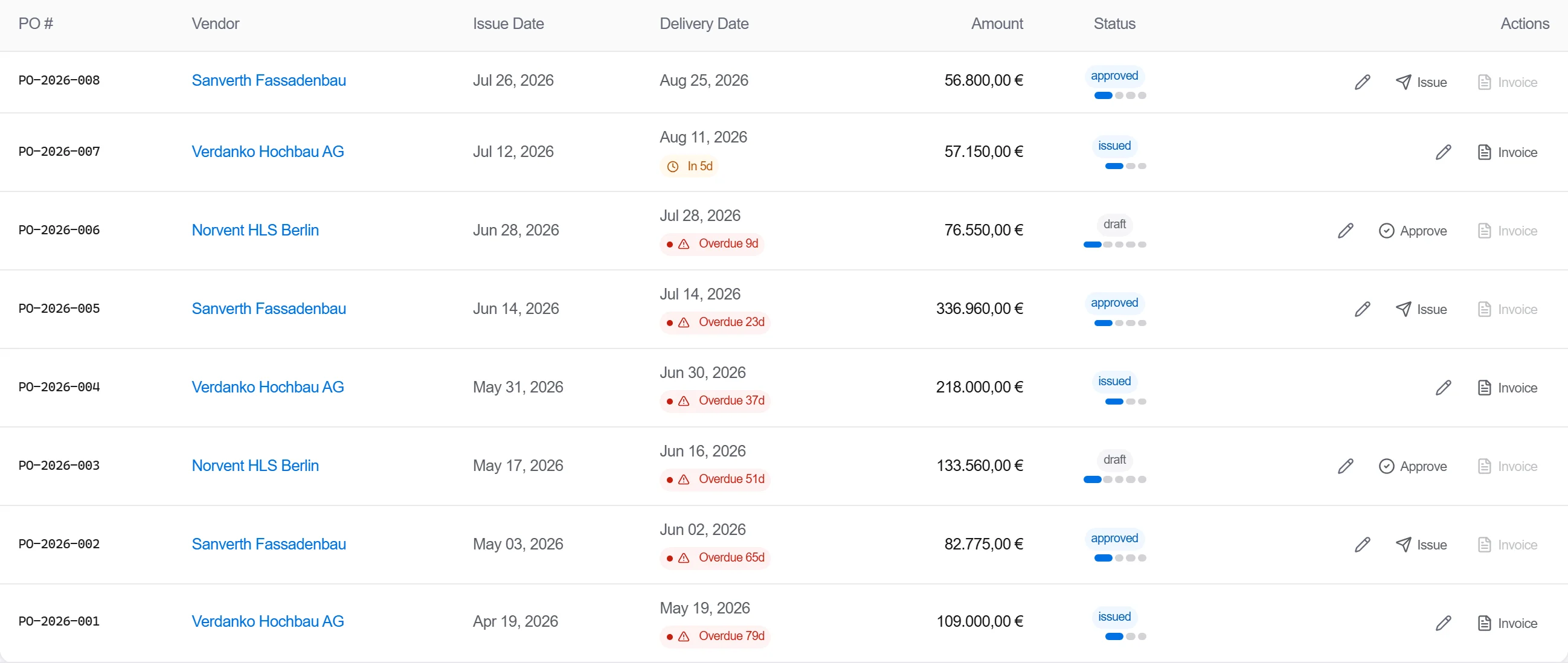
Hvorfor: En langlevert vare ingen flagget er den som stopper et fag brått. Å finne dem tidlig er det som gir deg ukene du trenger til å bestille i tide i stedet for å påskynde til overpris senere.
Regn tilbake fra hver dato for påkrevd på plassen gjennom leveringstiden til datoen bestillingen må legges, og sett de bestillingsfristene som milepæler på fremdriftsplanen teamet jobber til.
Hvorfor: En dato for påkrevd på plassen alene forteller ikke innkjøp når de skal kjøpe. Å legge leveringstiden inn på fremdriftsplanen er det som gjør et leveringsbehov om til en bestillingsfrist noen står ansvarlig for.
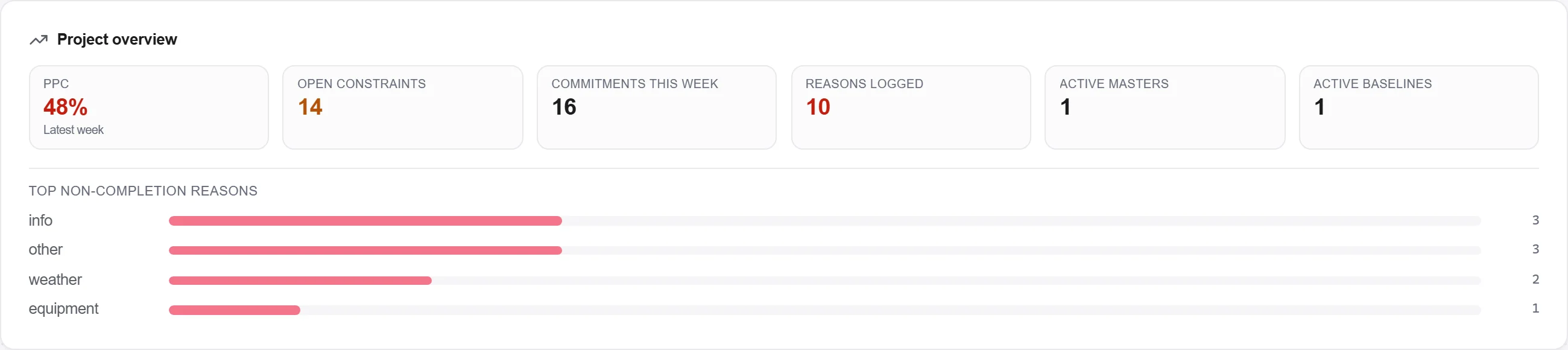
Rapporter hvilke langleverte varer som er bestilt mot plan og hvilke bestillingsfrister som glir, slik at varene fortsatt i risiko for fremdriftsplanen er synlige for teamet ved hver gjennomgang.

Hvorfor: En innkjøpsrisiko du ikke kan se er en du styrer med flaks. Å rapportere eksponeringen holder de glidende varene foran folkene som kan påskynde dem før de blir en forsinkelse på plassen.
3 / 190 plattformmoduler
Take a job from the very first setup right through to handover. Create it, price the work,…
Plan the programme, freeze a baseline to measure against, feed real progress back from site…
See where the job truly stands against the plan and the budget: bring the programme current…