

Estimating & costing
Price a building from a PDF
Start from a flat PDF drawing and finish with a priced, validated estimate ready to export.…
5 steps15 minOpen
 ENEnglish
 DEDeutsch
 FRFrançais
 ESEspañol
 ES-MXEspañol (México)
 ITItaliano
 PTPortuguês
 NLNederlands
 PLPolski
 CSČeština
 RUРусский
 BGБългарски
 TRTürkçe
 SVSvenska
 NONorsk
 FISuomi
 DADansk
 ARالعربية
 ZH中文
ZH中文 JA日本語
JA日本語 KO한국어
KO한국어 HIहिन्दी
 THไทย
THไทย VITiếng Việt
 IDBahasa Indonesia
 RORomână
 HRHrvatski
 MNМонгол
 ETEesti
 BNবাংলা
 KKҚазақша
 KYКыргызча
 FILFilipino
 URاردو
 FAفارسی
 HEעברית
 ELΕλληνικά
Handle the parts of a bill the design cannot yet fix - provisional sums, prime cost sums and allowances - kept separate from measured work so each one has an owner and can be drawn down cleanly.
4 steps across the platform - what you do at each one, and why it matters.
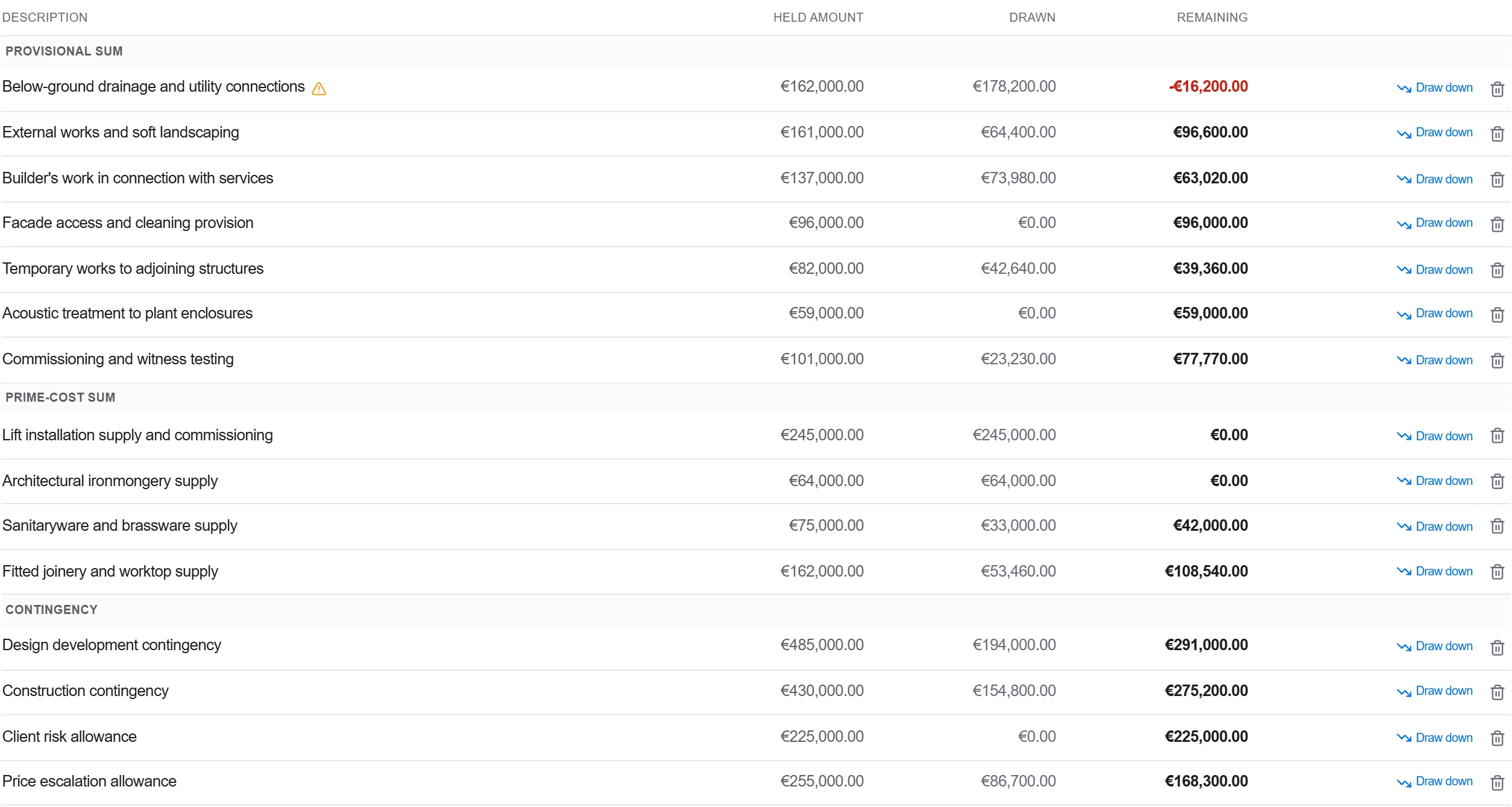
Go through the scope and list every element the design cannot yet price firmly: undesigned finishes, a specialist package still out to market, statutory connections, a prime cost item.
Why: Naming the soft spots up front is what stops them being priced twice or missed entirely. It also tells the client exactly which parts of the number are still to be firmed up.
Mark each one as a defined or undefined provisional sum, a prime cost sum or an allowance, then record the basis behind the figure and who owns firming it up.
Why: A defined sum carries programme and preliminaries; an undefined one does not. Getting the type right now decides whether you can claim time and cost when it is finally instructed.
Bring the sums into the bill in their own section, clearly separate from measured work, so the tender total shows firm price and provisional money apart.
Why: Kept separate, the sums can be expended and adjusted through the job without disturbing the measured rates. Buried in the rates they become impossible to track or hand back.
Validate that nothing sits in both a rate and a provisional sum, that every sum has an owner, and that the totals reconcile before the bill goes out.
Why: Double counting a package is an easy way to price yourself out of a job; missing it is an easy way to lose money. A quick validation pass closes both traps at once.
3 / 190 platform modules
Start from a flat PDF drawing and finish with a priced, validated estimate ready to export.…
Put a priced bill through the validation rules, clear every warning and error, then export…
Pull priced items from a real cost database, build the bill from them, bundle recurring bui…