

BIM & takeoff
Get 6D carbon from a BIM model
Turn a converted BIM model into an embodied carbon footprint. Auto-enrich reads quantities…
5 steps12 minOpen
 ENEnglish
 DEDeutsch
 FRFrançais
 ESEspañol
 ES-MXEspañol (México)
 ITItaliano
 PTPortuguês
 NLNederlands
 PLPolski
 CSČeština
 RUРусский
 BGБългарски
 TRTürkçe
 SVSvenska
 NONorsk
 FISuomi
 DADansk
 ARالعربية
 ZH中文
ZH中文 JA日本語
JA日本語 KO한국어
KO한국어 HIहिन्दी
 THไทย
THไทย VITiếng Việt
 IDBahasa Indonesia
 RORomână
 HRHrvatski
 MNМонгол
 ETEesti
 BNবাংলা
 KKҚазақша
 KYКыргызча
 FILFilipino
 URاردو
 FAفارسی
 HEעברית
 ELΕλληνικά
Stand up the common data environment, load the information containers with the right status, and aim coordination at the shared area.
5 steps across the platform - what you do at each one, and why it matters.
In the CDE, define the status states, work in progress, shared, published and archived, and lay out the folder structure.
Why: If everyone reads and writes to their own copies, someone builds from a superseded drawing. The states tell you what is safe to use and what is still a draft.
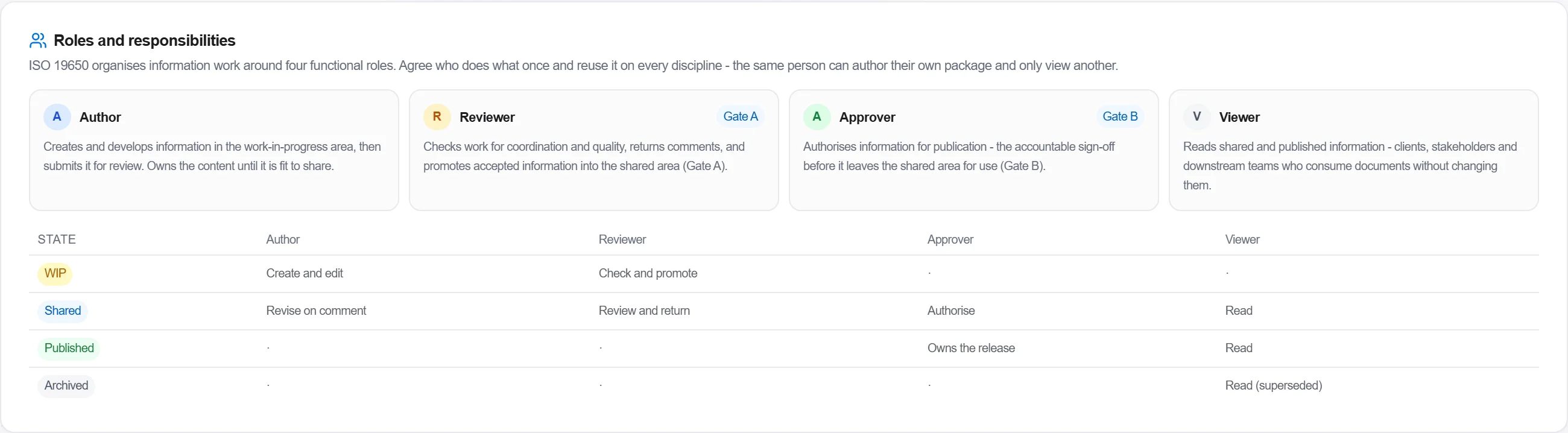
In the CDE setup, give each person a functional role. The Author creates and edits information in work in progress and submits it for review. The Reviewer checks it for coordination and quality and promotes accepted work into the shared area. The Approver authorises a container into published, the accountable sign-off before it leaves the shared area. The Viewer reads shared and published information without changing it.
Why: These are responsibilities in the document workflow, not job titles. One person can author their own discipline and only view another. Fixing who holds each role is what makes a gate crossing accountable instead of anonymous.
In Project Files, load the information containers, models, drawings and documents, and set each one to its status.
Why: A container with no status is a trap, nobody knows if it is checked or just parked. Correct status is what lets the next person trust the file.
In Approval routes, open the Dry run panel on your chosen review preset. It walks the route step by step and shows how many approvals each step needs, whether the route reaches approved, and any design warnings, all without starting a real workflow.
Why: A review route that can never clear, or that needs two approvers where you meant one, only bites once real work is stuck in it. The dry run proves the flow terminates at approved before anyone routes a live container through it.
In Coordination, point the model federations at the shared area so everyone coordinates against the same set.
Why: Clash checking against private working models finds clashes that are already fixed and misses the ones that are not. The shared area is the single source everyone federates from.
4 / 190 platform modules
Turn a converted BIM model into an embodied carbon footprint. Auto-enrich reads quantities…
Load a converted model, lift the element quantities straight off the geometry, carry them i…
Load a DWG, lock the scale against a known dimension, measure the areas, lengths and counts…
